
The first question I get on almost every Video Editor search is the same.
“How many videos can they do?”
Not what kind of videos. Not how long. Not what the editing style looks like. Not whether they have any footage shot yet, any brand guidelines, or any reference examples.
Just: How many.
And every time, I have to stop the conversation and drag it back to the beginning. Because if you can’t answer the basic questions about your own video operation — how many you produce, how long they run, what complexity level they require — you have absolutely no business asking someone else to answer them.
It’s like calling a moving company and leading with, “How many guys do you need to send?”
I don’t know. How big is your house? What floor are you on? Do you have a piano?
This guide exists to fix that. Real pricing. The actual workload math. A framework for complexity that no one else is publishing. And the hard truth about what makes most Video Editor hires fail — before you ever start looking.
Let’s get into it.
Last Updated: March 4th, 2026
Table of Contents
- The Editing Complexity Guide — The Only Workload Math That Matters
- What Hard Actually Looks Like — A Visual Breakdown
- Part-Time vs. Full-Time When Hiring a Video Editor
- What Kind of Video Business Are You?
- What a Video Editor Actually Does (And What They Don’t)
- The Software Question
- Portfolios Are Lying to You
- The Trial Task — And Why Clients Always Blow It
- What It Actually Costs
- The Letting-Go Problem
- FAQ
- The Bottom Line
The Editing Complexity Guide — The Only Workload Math That Matters
Before you can answer “how many videos can they do,” you need to answer a more important question:
What kind of videos are you making?
A 10-minute talking head with clean subtitles and a few zoom cuts is not the same job as a 10-minute video with custom motion graphics, on-location footage, cinematic B-roll, and an animated intro sequence.
Both are 10 minutes. One takes two days. One takes two weeks.
We use a six-tier complexity framework internally at HireUA. It’s the clearest way I know to cut through the confusion on Video Editor searches — and it’s the framework you should be using to write your job description.
Raw — Unedited
Posted directly to YouTube, untouched. No editor involved. Raw footage from a single camera. Fine for some content. Not a hire question.
Example:
Minimal Edit — (Less than 1 day / under 8 hours)
Two camera angles synced, screenshare integrated if there is one. Audio enhanced, color corrected. A punchy intro edit. Basic zoom effects used sparingly on the rest. Nothing fancy.
This is the floor for professional video. If your content lives here permanently, you probably don’t need a full-time editor.
Example:
Light Edit (2–3 days / 16–24 hours)
Everything in Minimal, plus: Animated subtitles throughout, icon overlays, simple frames, consistent zoom effects across the whole video. The editor is making editorial decisions — what to cut, when to zoom, which moments to emphasize.
It looks like a well-produced YouTube video. No one would guess the budget was under $3,000 a month. This is the most common tier for growing channels and the sweet spot for most founder-led video content.
Example:
Medium Edit (Up to 5 days / ~40 hours)
Light plus motion graphic templates, animated section transitions, kinetic typography, and more deliberate B-roll selection. The editor is now making aesthetic decisions that require actual creative taste.
Think: A purple animated data-visualization background with floating numbers and two-color word emphasis. A 3D puzzle animation used as a B-roll replacement with branded lower-thirds. A talking-head video where the subtitle treatment has its own visual logic.
It looks polished. It looks like a real brand made it.
Example:
Advanced Edit (Up to 10 days / ~80 hours)
Multiple shooting locations. Multiple cameras. Heavy B-roll, stock footage, or custom-shot footage composited together. Custom motion graphic templates built specifically for this video. AI compositing — imposing a speaker onto a generated background environment, or inserting real-life footage of actual places instead of generic stock.
This is also where taste becomes non-negotiable. We did a video about the 13 best places to hire a Virtual Assistant — the editor imposed actual travel footage of each city instead of using corporate stock images of people shaking hands in offices. That decision is not in the brief. That’s judgment.
An Advanced editor isn’t just executing. They’re making calls.
Examples:
Pro Edit (10+ days / timing varies)
More than 10 days of editing. These are specified per project because the variables are too wide to generalize.
Think: A full company history video with archival war footage displayed across multiple angled 3D screens, glitch effects, chromatic aberration, and film grain. Or a Cost of Living series shot on-site across five cities with multiple cameras, location-specific B-roll, and full post-production.
You know it when you see it. And you know it’s not the same conversation as hiring someone to edit a weekly podcast.
Examples:
What Hard Actually Looks Like — A Visual Breakdown
Now that you’ve seen the tiers on paper and watched the videos, let me show you specifically what makes some of these technically difficult — and what doesn’t.
Because there’s a big difference between “looks impressive” and “took a lot of skill.” This section breaks down exactly what’s happening in each frame, so you know what you’re actually asking for when you write a job description.
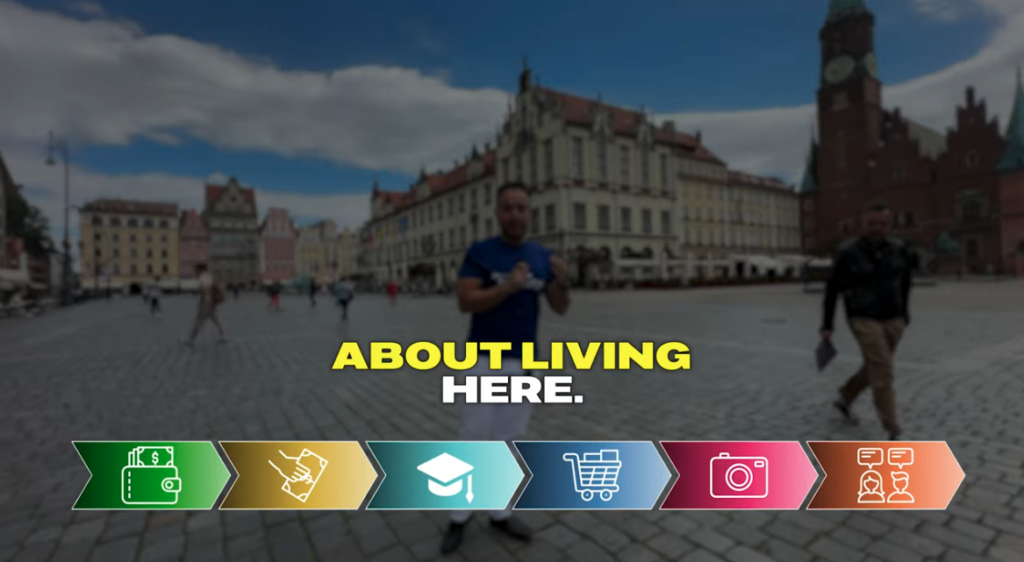
What you’re looking at:
On location in Wrocław’s market square. A color-coded icon progress bar tracks the video’s sections, each segment with its own icon, color, and animated reveal.
Why it’s complex:
Multiple design layers are happening simultaneously. The progress bar is a custom template requiring individual icon design, color coding, and frame-by-frame timing. A Light editor can’t do this. You’re looking at an Advanced editor at minimum, probably 5–7 days just for the graphic system in this video alone.
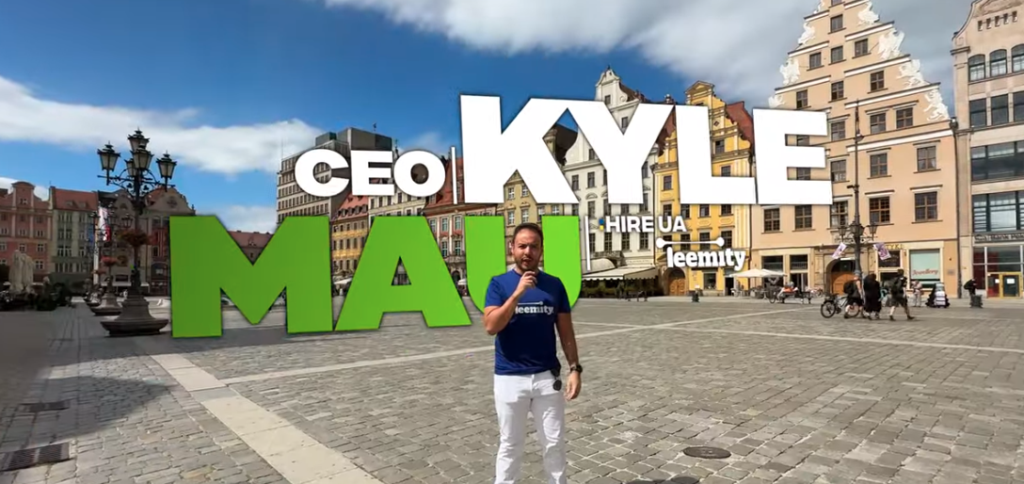
What you’re looking at:
The intro sequence from the same Wrocław video. Massive 3D-extruded text — “KYLE MAU” in white, “CEO | HIRE UA” in smaller block text — composited directly into the real-world background. The green block letters at street level look like they physically exist in the square.
Why it’s complex:
This is 3D text compositing into live footage. The letters have to be tracked to match camera movement, lit to match the environment, and scaled to feel like they belong in the actual space. This is not a filter. This is not a template drag-and-drop. Someone built this from scratch for this specific scene. If your intro looks like this, you’re not hiring a YouTube channel editor. You’re hiring a Motion Graphics Artist who also edits.
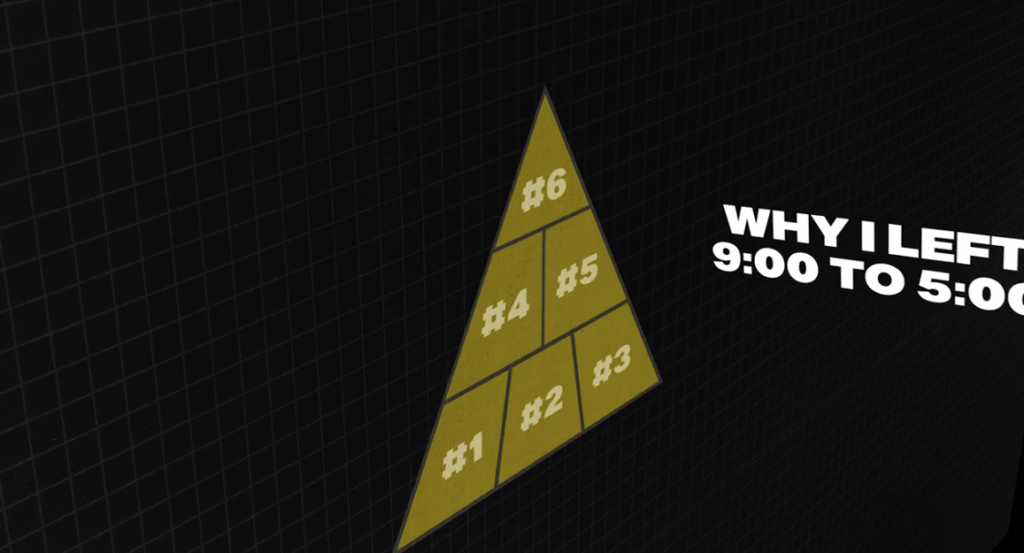
What you’re looking at:
A fully custom 3D pyramid graphic — segmented, numbered, built on a dark grid background — with bold white overlay text introducing the video’s six reasons. This is from the “Why I Left the 9-5” video.
Why it’s complex:
That pyramid was designed and animated specifically for this video. The grid background isn’t a stock asset — it’s a motion graphic environment. The numbered segments animate in sequence. Someone made creative and technical decisions about how the structure was going to look, then built it. This is the difference between a $1,500/month editor and a $3,000/month one. The cheaper one would have put text on a black background. This editor built a visual system.
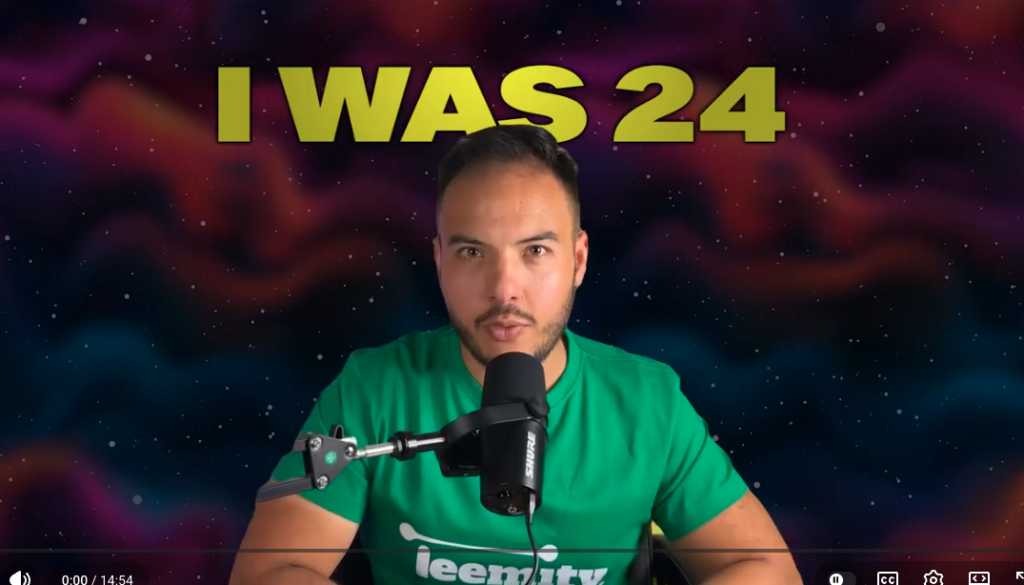
What you’re looking at:
A podcast-format talking head, but the background is not a real room. It’s a designed deep-space environment — purple nebula clouds, stars, atmospheric glow — composited behind the speaker. “I WAS 24” appears in large brand-yellow text across the top.
Why it’s complex:
I’ve been keyed out and placed into a completely different environment. That environment was either generated with AI or sourced and composited deliberately. The text treatment is consistent with brand typography. This is the AI compositing technique that Radoslav — our internal editor — developed as part of his workflow. It’s not common. It requires both technical skill and enough taste to make it look intentional rather than cheap.
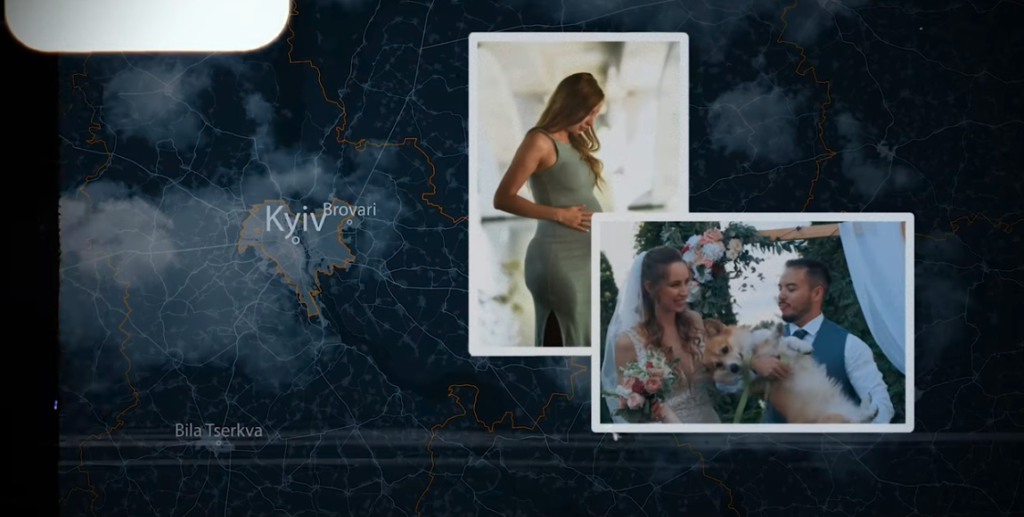
What you’re looking at:
An animated map of Ukraine zooming into Kyiv, with atmospheric cloud and smoke effects layered over the geography. Two personal photos — composited with drop shadows and slight rotation — float on top of the map. This is from “The History of HireUA” — detailing the day I fled with my family from Ukraine.
Why it’s complex:
Everything in this frame is a separate asset: The animated map, the cloud effects, each photo with its own position, shadow, and rotation. They’re all moving, transitioning, and timed to audio. This is storytelling through motion graphics — not a talking head with subtitles. It required significant pre-production thought about what the visual narrative should be, then significant post-production time to execute it. This is Pro work.
What you’re looking at:
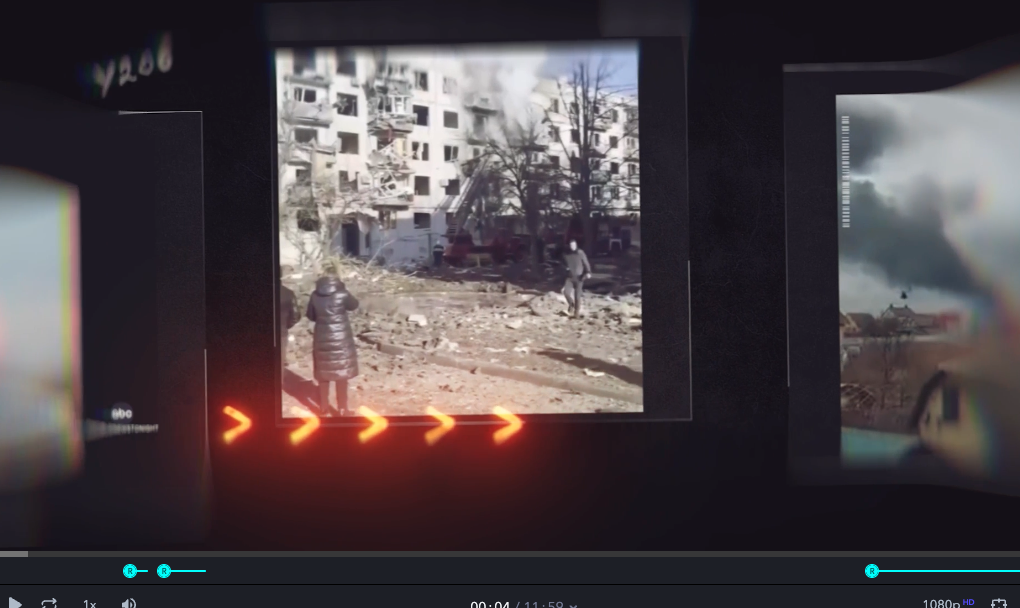
This is from the History of HireUA. Archival footage of destroyed buildings in Ukraine is displayed across multiple 3D-angled screens floating in a dark environment. Animated directional arrows pulse across the bottom. Chromatic aberration and film grain effects give the whole thing a distressed, cinema-quality feel.
Why it’s complex:
This frame alone contains: A custom 3D environment, multiple video panels with individual positioning and animation, archival footage curation and color treatment, glitch effects, film grain overlay, and animated arrow graphics — all timed together. This is not editing. This is directing in post. It’s what Pro-level work actually means.
The point of all this:
Most people hiring a Video Editor picture the Advanced or Pro examples when they describe what they want.
Most people’s budgets and output volume point to Light.
Neither is wrong. But knowing the difference before you start the search is the difference between a hire that works and a search that wastes everyone’s time.
Part-Time vs. Full-Time When Hiring a Video Editor
Here’s the math people never bother to do before they start a search.
Take an 8-minute Light edit video. That’s roughly 16 hours of editing — the one hour per finished minute rule holds at this complexity level, sometimes more. Two of those per week and you’re already at a full-time hire.
Here’s the general formula:
| Complexity | Hours Per Video | Videos/Month (Part-Time — 20h/week) | Videos/Month (Full-Time — 40h/week) |
|---|---|---|---|
| Minimal | <8 hrs | 8–10 | 16–20 |
| Light | 16–24 hrs | 3–4 | 6–8 |
| Medium | ~40 hrs | 2 | 4 |
| Advanced | ~80 hrs | 1 | 2 |
| Pro | 80+ hrs | <1 | 1 |
The rule of thumb:
Under 8 Light/Medium videos per month — part-time makes sense.
Over 8 — full-time.
Under 2 videos per month at any complexity level — skip the placement entirely. Use a freelancer on Upwork. A managed or direct hire doesn’t make sense at that volume. You don’t need an employee. You need a vendor.
And here’s what nobody wants to hear:
If you don’t know where your content falls on this chart — if you can’t tell me whether your videos are Light or Medium, how long they typically run, or how many you produce per month — you’re not ready to hire a Video Editor.
Go back to square one, figure out your content operation.
What Kind of Video Business Are You?
The complexity guide tells you the workload. But the type of business you’re running changes what you need in the hire.
Three types. Figure out which one you are.
The Brand or Organization
You know what you want. You have reasonable ramp expectations. Your onboarding materials are solid and you’re not expecting someone to be fully dialed in until they’ve had a few weeks to absorb your style.
This is the most straightforward search. The main challenges are matching complexity expectations to budget, and portfolio screening — which we’ll get to below.
The YouTube Agency
You need as many videos as possible, as fast as possible. You probably have decent documentation. You think your onboarding is tight.
It usually isn’t.
YouTube agencies tend to have a McDonald’s delusion about their process. They believe their SOPs are so good that they can plug in a new editor and have them at full output by week one. Like a 16-year-old running the fry machine on day one of the job.
The reality:
A new editor needs about a month to properly learn your channel’s style, your feedback preferences, and your revision process. YouTube agencies typically expect one week. That gap is where the churn lives.
The other issue: The volume expectations are brutal. Three long-form videos a week is not uncommon at some agencies. At Light complexity, that’s 48+ hours of editing per week. More than full-time. A lot more.
The best agencies know this and hire accordingly. The rest keep wondering why editors quit.
The Freelancer or Solopreneur
You’re replacing yourself. You’ve been editing your own videos, and at some point you looked at the hours going into Premiere Pro and realized that’s not a good use of your time.
The challenge here isn’t finding a good editor. It’s letting go.
I call this the Dorit hump — named after a client who came to me trying to replace herself in her own content operation. Brilliant at what she does. Couldn’t accept that someone else would do it at 80% of her level.
Here’s what I tell people in this situation:
When you’re ready, you’re ready. There’s nothing I can say on a call that will make you actually let go. If you’re unwilling to accept someone doing 80% of what you’re capable of, you’ll always be the bottleneck. Your business doesn’t grow. You just keep grinding.
Every hour you spend in Premiere is an hour you’re not getting clients.
What a Video Editor Actually Does (And What They Don’t)
Let’s clear this up because it’s a constant source of failed hires.
A Video Editor owns:
Pacing and cuts. Color grading. Audio sync and enhancement. Animated subtitles and captions. B-roll selection from what you provide. Music selection within approved style. Basic motion graphics. Zoom and emphasis effects. Consistency across episodes.
A Video Editor does not own:
Hooks and scripts. Thumbnail or graphic design. Creative direction. Ideation. The concept for what the video is about.
Here’s the thing:
If you want someone coming up with your hooks, scripting your intros, and telling you what to say — that’s not a Video Editor. That’s a Creative Strategist or a Content Director. A completely different and more expensive hire.
Editors (mostly) edit.
They’re do-ers, not ideators. Give them clear direction and they execute at a very high level. Ask them to supply the direction and you’ll be disappointed every time.
The YouTube retention exception:
High-retention YouTube editing — the Mr. Beast style, the VSL approach — is a different animal. These editors understand that everything in the video is a funnel.
Every cut, every graphic, every music choice has one job: Keeping people watching ($$$).
They think in hook frames, pattern interrupts, and pacing that drives completion rates.
This editor understands that a YouTube video isn’t just content — it’s a sales mechanism. And finding one who actually gets that distinction is rare.
The thumbnail question:
Most Video Editors cannot do thumbnails. It’s a different skill set — deep Photoshop work, not Premiere — and a different creative muscle entirely.
Occasionally you find an editor with genuine input into thumbnail concepts based on the best first frames of the video. Occasionally you find a gem who can do both.
Radoslav, our internal editor, does both. He’s not available.
Put thumbnails as a “very, very, very, very, very nice to have” on the job description. Never a hard requirement unless you want to fish in a very small pond for a very long time.
Sharks don’t hang out in ponds.
Hopefully I made my point by the number of “veries” above.
The Software Question
Does it matter? Somewhat.
Here’s the quick mental map:
Adobe Premiere Pro — Industry standard for long-form. A serious YouTube or Brand Video Editor almost certainly uses Premiere. This is the default assumption for most searches.
DaVinci Resolve — Cinema-grade color grading. If someone is heavy in DaVinci, they think about color at a level most YouTube channels don’t need. Strong signal for high-production content.
Final Cut Pro — Mac-native. Common among freelance and indie editors. Solid for long-form. Not a red flag.
After Effects — Motion graphics and compositing. If you’re expecting Advanced or Pro-level edits, you want someone who knows their way around After Effects. This is where the custom templates, 3D text compositing, and animated graphic systems get built.
The gap rule:
If everything in your workflow lives in DaVinci and the candidate has never touched it — that’s too wide a gap. Tool compatibility matters more than tool prestige. A great Premiere editor who’s never opened DaVinci can’t just figure it out on your timeline.
But generally: Don’t over-index on software. The talent matters more than the tool.
Portfolios Are Lying to You
A portfolio shows you what a Video Editor was asked to create.
Not what they’re capable of creating.
Someone who spent three years editing wedding reels has a portfolio full of wedding reels. That doesn’t mean they can’t edit a punchy YouTube video about remote hiring. It means nobody has ever asked them to.
The editor who’s going to nail your channel might have a portfolio that looks nothing like your content. Give them a clear brief, solid reference examples, and a trial task — and they’ll surprise you.
On the other hand, I’ve seen editors with gorgeous reels completely bomb a trial because they’d only ever worked on their own passion projects. Their portfolio was a highlight reel of personal taste — not proof they could execute someone else’s vision.
What actually matters: Taste and speed.
Can this person look at your content, understand your style, and execute it without being spoon-fed every detail?
That’s the question. A portfolio doesn’t answer it.
The Portfolio Test:
We go to candidates and say: Here are three examples of what the client needs. Find 3–5 pieces in your own portfolio that best match, and explain in one sentence why each is relevant.
That’s it.
If they can identify the right pieces from their own work — they pass the first gate. If they send their “best work” with no connection to what you actually need, they don’t.
You’re not testing editing skill yet. You’re testing whether this person can read a room.
The taste signal:
Bad taste shows up in the small details.
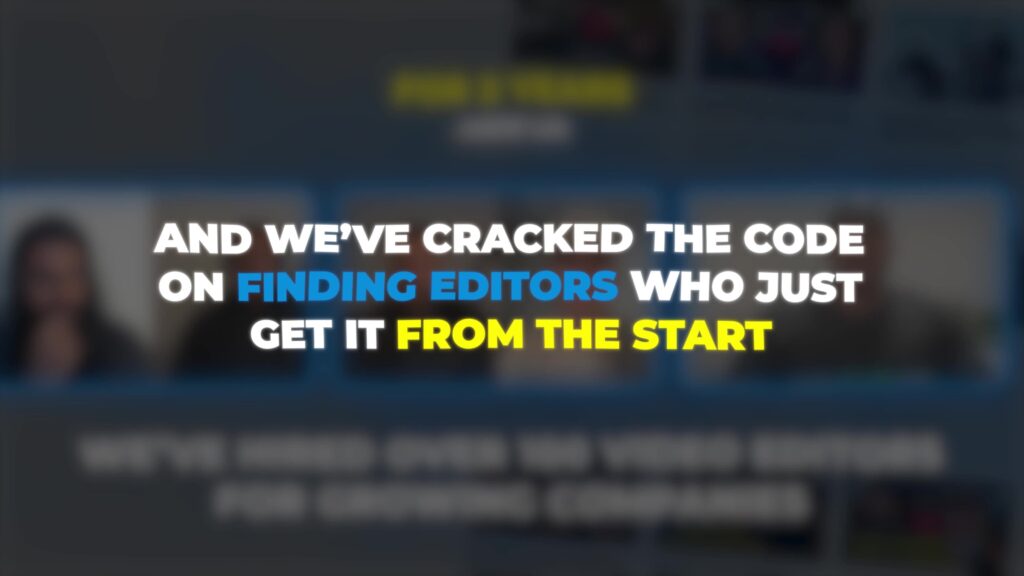
Do the fonts look intentional, or is it Comic Sans with random capitalization? Is the B-roll relevant to the topic or is it stock office footage of people high-fiving in conference rooms? Is the color grading consistent across the edit or does every cut feel like a different video?
A great editor makes choices that serve the content. A bad editor makes no choices at all and goes with whatever the default is.
The Trial Task — And Why Clients Always Blow It
The trial task is the best screening tool you have.
Professional Video Editors know what a trial means. They know they’re being evaluated. They know they need to show up and perform. You don’t need to apologize for it or over-explain it.
But you do need to be reasonable.
Asking someone to deliver a 15-minute Pro-level edit as a trial is not a trial. That’s a week of unpaid work dressed up as a screening process. You’ll lose every serious candidate immediately — the ones who know their worth don’t audition for free at that scale. The ones who stay are the ones who don’t know any better.
A good trial is short, focused, and representative of the actual work. A 3–5 minute clip. Light to Medium complexity. Clear brief. Tight timeline. You’re not testing their ability to endure — you’re testing their judgment, their taste, and how well they read your style with minimal direction.
Here’s the minimum you need to give an editor before they start:
→ Raw footage → Two or three reference videos representing the style you want → A B-roll folder → Brand fonts → Any specific instructions — preferred subtitle style, music vibe, things you hate
If you give them a bad brief, you get a bad output. That’s on you, not them.
The feedback problem:
Most clients get back a first cut, watch it for 30 seconds, and send back something like:
- “This doesn’t feel right.”
- “The B-roll isn’t appropriate.”
- “The graphics aren’t the right style.”
That is not feedback. That’s telling the chef “it tastes weird” and walking away. What temperature? Too salty? Wrong protein? No one knows. Nothing gets fixed.
Here’s what actual feedback looks like:
“At 2:14, this B-roll doesn’t fit — use travel footage of the actual city, not a generic office shot.”
“The music in the intro is too aggressive for this topic — go more conversational.”
“At 0:45, cut harder on that transition — we don’t need to hear the full pause.”
Specific. Time-stamped. Actionable.
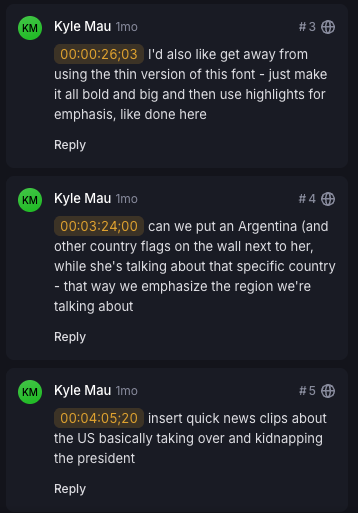
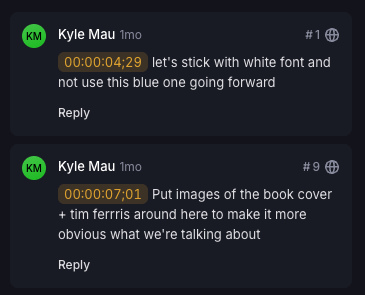
We use Frame.io for exactly this reason. You drop a note at any timestamp, explain what needs to change, reference what good looks like. It eliminates the revision loop that wastes everyone’s time.
Here is actual feedback I gave on a recent video:
And here’s a move worth making:
If you have previous Frame projects with saved feedback and revision history, share access before the trial starts.
Let the candidate see what notes you’ve given on past edits, what was adjusted, and how the work evolved. It’s preventative medicine — they go in already understanding your eye, your preferences, and how you communicate. The first cut comes back closer to right without a single round of feedback.
But here’s the thing:
The feedback problem is also an onboarding problem. If you don’t establish what “right” looks like before the editor starts — with reference videos, with examples of things you hate, with a clear visual identity — you have no basis for any feedback at all.
You can’t tell someone they missed the target if you never showed them where it was.
What It Actually Costs
Eastern European Video Editors: $2,500–$3,500/month full-time.
Latin American: Roughly 15% cheaper than EE across the board.
US-based equivalent: Significantly more. A full-time editor with comparable skill runs $60,000–$80,000+ annually before benefits.
The math on overseas is obvious. What’s less obvious is that the Eastern European talent pool — Ukraine, Serbia, Kosovo, Macedonia — is competing on more than price. The depth of long-form YouTube and brand editing experience out of that region is genuinely strong. We’ve placed editors from there for YouTube agencies, e-commerce brands, and SaaS companies with consistently solid results.
Two hiring models:
Direct hire — You pay HireUA 15% of the annual salary as a one-time fee. At $3,000/month, that’s $5,400. You work with the editor directly, handle payroll, own the relationship. Guaranteed for six months with one replacement.
Managed model — You pay through HireUA. We mark up the salary by 35%, capped at $1,200/month. We handle compliance, payroll, and replacement if needed. You manage the output.
Most Video Editor placements start on the managed model and migrate to direct hire once the relationship is established.
The Letting-Go Problem
Here’s the most honest thing I can tell you about hiring a Video Editor:
The biggest blocker is…you.
I said it on a call recently to a YouTube agency owner who’d been thinking about hiring for over a year. He’d been doing everything himself — building the business, editing the videos, all of it.
Here’s what I said:
You can either stay a freelancer and do it all yourself and never have a break. Or you accept that no one will do it as good as you and learn to live with it. It’s a constant battle. It doesn’t ever actually end. You either hire the best people you can — or you keep doing it yourself, which eventually you just can’t, if you want it to grow.
There’s nothing we at HireUA can say on a sales call that will make someone cross that line before they’re ready.
What I can say is this:
Nobody is ever going to care about your content as much as you do. That’s not a reason to never hire. It’s just reality. An editor at 80% of your capability who frees up 15 hours of your week is worth more than you doing it yourself at 100%.
Every hour you spend in Premiere is an hour you’re not getting clients.
When you’re ready, you’re ready.
FAQ
How much does a Video Editor cost?
Eastern European editors run $2,500–$3,500/month full-time. Latin American editors are roughly 15% cheaper. US equivalents run $60,000–$80,000+ annually before benefits.
Should I hire a part-time or full-time Video Editor?
Depends on output volume. Under 8 Light-to-Medium complexity videos per month — part-time makes sense. Over 8, or if you’re doing 2+ long-form videos per week — full-time. Under 2 videos per month at any complexity — use a freelancer, not a placement.
Can my Video Editor do thumbnails?
Usually not. Thumbnail design is a different skill, typically Photoshop-based, and uses a different creative muscle than editing. List it as a nice-to-have, never a requirement. If you need consistent thumbnail production, budget separately for a Graphic Designer.
How long does it take a new editor to ramp up?
Plan for a full month before someone is dialed in on your style. YouTube agencies tend to expect one week — that expectation is where editor churn comes from. Give 4–6 weeks with clear references and consistent feedback before you evaluate whether it’s working.
Can the same editor handle short-form and long-form?
Often yes — but portfolios may only show one. Someone who’s been doing primarily short-form social content may need time to adjust to long-form pacing and structure. Test cross-format capability in the trial task rather than eliminating candidates at the portfolio stage.
What software should a Video Editor know?
For long-form YouTube and brand content: Adobe Premiere Pro is the industry standard. Final Cut is solid. DaVinci Resolve signals color grading depth. After Effects is important for anyone you expect to produce Advanced or Pro-level motion graphics. The key question is tool compatibility — if your operation is built in DaVinci and they’ve never touched it, that’s too wide a gap regardless of how talented they are.
How many videos can one editor do per month?
Depends entirely on complexity. Light at 16–24 hours per video: 3–4 per month part-time, 6–8 full-time. Medium at ~40 hours: 2 per month part-time, 4 full-time. Advanced at ~80 hours: 1 per month part-time, 2 full-time.
What’s the biggest mistake people make after hiring a Video Editor?
Not establishing clear feedback protocols before the editor starts. Telling them “this doesn’t feel right” instead of dropping specific, time-stamped notes in Frame.io. The revision loop that kills most editor relationships isn’t a talent problem. It’s a communication problem — and it almost always starts on the client side.
The Bottom Line
If you’ve read this far, you already know more about hiring a Video Editor than 90% of the people who contact us.
You know the complexity tiers. You know the workload math. You know what editors own and what they don’t. You know why portfolios are misleading and what the trial task actually tests.
What you do with that is up to you.
If you want HireUA to run the search — pre-vetted, interview-ready candidates in Eastern Europe or Latin America within days, not weeks — start here.
If you’re still figuring out your content operation, come back when you can answer three questions:
How many videos do you produce per month? How long do they run? What complexity level are they?
If you know those three things, you’re ready to hire.