

What is a Virtual Assistant? Let me save you about 20 minutes of reading the same generic AI-slop articles that all say the same thing.
The simple answer: A Virtual Assistant is a remote worker who handles tasks for your business from somewhere else in the world.
That’s it.
That’s the definition.
You don’t need 500 words of “in today’s dynamic and ever-changing business environment full of alignment and clarity” to understand the concept.
What you DO need is someone to tell you the truth about hiring one — because there’s a massive gap between what people think VAs do and what actually happens when they hire one.
I run HireUA. We’ve placed hundreds of Virtual Assistants with businesses across the US, Europe, and beyond. I’ve seen the wins, the disasters, and everything in between.
By the end of this article you’ll know the answer to “What is a Virtual Assistant”, what they do, how to hire one, how to train one, how to fire one if needed, and ultimately — how you succeed with one.
What is a Virtual Assistant Doing on a Day to Day Basis?
When most people hear “Virtual Assistant,” they picture someone answering emails and managing a calendar. And that’s part of it. But the reality is way broader than that.
Here’s what VAs are doing for our clients right now, today:
Admin and Operations
Email management, calendar coordination, scheduling meetings, booking travel, filing expense reports, organizing files, managing documents, and handling the hundred little tasks that eat 2-3 hours of your day without you even noticing.
This is the bread and butter. If you’ve never had a VA before, start here. It’s where you’ll feel the immediate impact.
Client and Customer Management
Forwarding messages, managing client relationships, responding to inquiries, updating CRMs, tracking follow-ups, and making sure nothing falls through the cracks. A lot of the time, what business owners actually need is someone sitting between them and their inbox, routing everything to the right place.
This is probably the most common thing our clients hire VAs for. Not glamorous. Incredibly valuable.
Social Media and Content
Posting to platforms, scheduling content, repurposing long-form content into clips and graphics, monitoring engagement, and managing comments. Some VAs handle basic design in Canva too.
Sales Support
CRM data entry, lead research, prospecting list building, following up with leads, managing email sequences, and tracking pipeline activity. Your sales team should be selling, not doing data entry. A VA handles the rest.
Bookkeeping and Finance
Invoicing, billing, payment processing, light bookkeeping, expense tracking, and chasing overdue payments. If you’re a business owner who’s behind on invoicing — and a lot of you are — a VA paying for themselves in collected revenue you would have missed.
Research
Market research, competitive analysis, gathering information for proposals, sourcing vendors, compiling reports. Anything that requires someone to dig through the internet and organize what they find.
The point is: A VA’s job isn’t one thing. It’s whatever set of tasks is eating your time that someone else could handle. The specific list depends on your business, your pain points, and what you actually need help with.
What a VA Is NOT
Just as important as knowing what a VA can do is knowing what they can’t. Because a lot of hires fail when someone expects a VA to do things that are outside the role entirely.
A VA is not going to see around corners for you. They’re not spotting your blind spots. They’re not acting as your right hand who intuitively knows what needs to happen next. They need to be told what to do. They ARE going to wait around for instruction — especially in the first few months. That’s the nature of the role.
Here’s what a VA cannot do for you:
Complex financial work. They’re not sending forms off to your US accountant for your wildly complex S-Corp tax filings. They’re not reconciling multi-entity financials. They can do invoicing, basic bookkeeping, and expense tracking — but anything that requires specialized accounting knowledge needs a specialist.
Immigration or legal paperwork. They’re not submitting your visa application. They’re not reviewing contracts. Anything with legal consequences needs a professional who understands the stakes.
High-judgment travel logistics. They can book you a direct flight and a hotel. They’re not routing you through five stops on a business class award ticket using points across three different airline programs. That’s a travel hacker, not a VA.
Strategic thinking. At least not initially. A VA executes within systems you build. They follow SOPs. They complete checklists. What they don’t do — at least on day one — is think strategically about your business.
That, however, is the starting line.
If you need ideas as to what your Virtual Assistant could do, check this post of 130 things a Virtual Assistant can help with.
Fancy Titles That Are Really Just VAs
This might ruffle some feathers, but it needs to be said.
A lot of roles that sound impressive on paper are, functionally, Virtual Assistants with a fancy job title. And there’s nothing wrong with that — until you start paying specialist rates for generalist work.
“Social Media Manager” — 90% of people with this title are glorified posters. They’re scheduling content in Hootsuite or Later, maybe making some Canva graphics, and responding to comments. That’s VA work. A real social media manager is building strategy, analyzing performance data, running paid campaigns, and driving measurable business outcomes. Most companies don’t need that. They need someone to post consistently. That’s a VA.
“Executive Assistant” — Sometimes. But if the person is doing basic calendar management, email forwarding, and scheduling, they’re a VA. A true EA anticipates your needs, manages your workflow independently, makes judgment calls on your behalf, and essentially operates as your chief of staff. Big difference in capability, big difference in price. Know which one you actually need.
“Project Coordinator” — In many cases, this is someone updating a Trello board and sending “checking in on this” messages. That’s VA territory. A real project manager is driving timelines, managing dependencies, and making resource allocation decisions.
“Marketing Assistant” — If the job is pulling reports, scheduling emails, updating the CRM, and formatting blog posts — that’s a VA. If it’s building campaigns, analyzing conversion data, and making strategic decisions about spend — that’s a marketing specialist.
Here’s why this matters:
If you hire someone as a “Social Media Manager” and pay accordingly, but you really just need someone to post your content three times a week — you’re overpaying for the title and underutilizing the person.
Call it what it is.
Hire a VA. Pay VA rates. Set VA expectations. Everyone’s happier.
Virtual Assistants by Industry: What This Looks Like in Practice
Marketing and Advertising
Marketing teams get buried in execution. A marketing VA handles: Pulling campaign reports and formatting them for clients, scheduling social media posts across platforms, making basic ad creative adjustments (swapping copy, resizing images), managing email campaign sends, formatting blog posts and uploading to CMS, vendor coordination, and asset organization. The key here is that your strategists stay on strategy — the VA handles the execution layer underneath.
Sales
Salespeople consistently spend less than a third of their time actually selling. The rest is admin. Not great for revenue.
A sales VA handles:
- CRM hygiene (updating records, logging calls, cleaning duplicate contacts)
- Basic follow-ups (“just confirming our call tomorrow at 2pm”)
- Call confirmation sequences
- Lead list building
- Prospect research
- Pipeline data entry
- Managing outbound email tools
- Your closers close, your VA handles everything else
Real Estate
Transaction coordination, lead management, listing uploads, CRM management, and client follow-up.
If you’re a real estate agent doing $3M+ in volume and you don’t have a VA, you’re leaving money on the table.
E-Commerce
Order management, returns processing, inventory tracking, customer service responses, product listing updates, review management, and basic Shopify/WooCommerce admin.
If you sell products online, a VA can handle nearly all of the operational overhead that comes with it.
Here’s a deep dive HireUA team member Sasha did on exactly how to hire a Virtual Assistant for your Shopify/e-com store:
Back-Office (Any Industry)
Invoicing, light bookkeeping, expense tracking, accounts receivable follow-up, data entry, report generation, document organization, and HR record keeping.
Business owners spend an average of 20 days per year — a full month — just chasing overdue payments.
A back-office VA directly impacts your cash flow.
If they collect even one overdue invoice per month that you would have missed, they’ve already paid for themselves.
The Fantasy vs. Reality of Hiring a VA

Here’s where I need to be honest with you, because this is where most people get it wrong.
The Fantasy
“I’ll hire someone for $400 a month and they’ll run my entire business while I sit on a beach.”
I hear some version of this every week…
Someone tells me they want a VA who can manage their email, do their social media, handle bookkeeping, run customer service, do marketing, coordinate projects, and maybe also build their website — all for $3-5 an hour.
This person doesn’t exist.
Or if they do, they’re juggling five other clients and giving you 20% of their attention.
The Reality
A good VA does a handful of things well.
You need to know what those things are before you hire — meaning YOU need to know what YOU need this person to do on a day to day basis and take off your hands.
And you need to pay enough to get someone who can actually execute at a professional level.
When a VA hire fails, it’s often the case that the VA wasn’t that bad themselves…it’s because the business owner had unrealistic expectations about what one person can do for the price of a hamburger.
Virtual Assistant Pricing — 2026 Prices

I’m going to be more direct than most companies in our space. Here’s the truth about VA pricing:
$400-$600/month (The Basement)
This is monkey work territory.
I don’t say that to be mean — I say it because at this price, you’re getting someone who can follow extremely specific instructions with limited judgment.
- Copy this here
- Paste that there
- Enter this data
They will likely still make mistakes, and you’ll spend time checking their work.
If your tasks are truly mechanical — pure data entry, simple copy-paste operations, basic scheduling — this can work. But don’t expect initiative, problem-solving, or independent thinking.
You get what you pay for.
$800-$1,200/month (The Sweet Spot for Basic VA Work)
This is where you start getting real competence.
Someone who can handle your email intelligently, manage your calendar without mistakes, keep your CRM updated, and execute tasks with accuracy. They follow processes reliably, communicate clearly, and don’t need you to hold their hand on every step.
For most business owners hiring their first VA, this is the right range. You’re getting someone who can genuinely take work off your plate — not just move it from your desk to theirs.
$1,500-$2,500/month (Mini-Executive Assistant Territory)
Now you’re getting into serious capability.
Someone who can think, not just execute. They anticipate what you need. They solve problems before you know they exist. They manage processes, not just tasks. They might push back on your ideas — respectfully — because they see something you missed.
This is the level where your VA starts feeling less like an assistant and more like a partner in running the business. For a business owner doing $500k+ in revenue, this level of VA support is where the real ROI lives.
$2,500+ /month (Executive Assistant Level)
At this point, you’re hiring an Executive Assistant, not a VA. Different role, different skill set, different expectations.
But if you need someone who can run your entire workflow independently — calendar, communications, project management, team coordination — this is the investment.
A Real VA Success Story: Solopreneur to $1M+ Agency
I can talk theory all day, but let me tell you what actually happened with one of our clients.
Marcos Ruiz came to us as a solopreneur. One-man show. He was running a Twitter marketing agency, barely cracking six figures, and doing literally everything himself. He didn’t even know what position he needed — he just knew he was drowning.
We helped him figure out that what he actually needed was an Executive Assistant. Not a social media person. Not a salesperson. Someone who could handle the miscellaneous stuff — client reporting, DMs, project management, a little bit of everything. A jack of all trades.
We placed Sophia with him.
Within a year and a half, Sophia had gone from EA to operations manager. She now manages all client success, all onboarding, the content organization, the file systems — she essentially runs the operational backbone of his company. She manages other people below her.
Here are the 2 case studies he’s done with us, telling the story:
And here’s the thing Marcos said that stuck with me: “She helped me learn a lot about my business.”
When he signed with us, The Birdhouse was doing barely six figures.
Today they’ve done well over a million dollars in sales.
Marcos actually flew from the US to Eastern Europe (Poland) to meet Sophia in person — they sat down and planned a multi-year company vision together. He calls her a partner in his business.
He put it on Twitter. It went viral.

The comment section was… something.
But the point stands…a great VA doesn’t just save you time. They can fundamentally change the trajectory of your company if you invest in them and let them grow with you.
That’s what’s possible.
Not with a $400/month hire you found on Fiverr. With a properly vetted professional who you treat as a real member of your team.
The good ones can grow into serious powerhouses over time.
Sophia started as Marcos’s jack-of-all-trades assistant, doing DMs and basic project management. But she didn’t walk in the door doing that. She grew into it because Marcos gave her clear direction, invested in her development, and expanded her responsibilities as she proved herself.
That’s the trajectory you should expect. Not, “Hire a VA who can do everything from day one and pay them $3/hour also can they pick up my dry cleaning?” That’s not happening.
Instead: Hire a VA who can execute today, and build them into someone who can lead tomorrow.
Best Places to Hire a Virtual Assistant
Now that you know what a VA does and know the answer to “what is a Virtual Assistant”, you’re probably wondering where the heck you begin looking for one.
There are VAs available from basically every country on earth.
Here’s what actually matters when it comes to regions:
Asia (Philippines, Vietnam, Thailand, India, Pakistan, etc.)

The cheapest option. The Philippines especially has a massive VA industry. You can find people for $5-$8/hour. The English is generally functional, and there’s a strong culture of customer service.
The tradeoff:
In my experience, you’ll spend significantly more time explaining things. The communication style tends to be very deferential — a lot of “yes sir,” “ok boss” — which sounds great until you realize it means they won’t tell you when something doesn’t make sense. You won’t get pushback. You won’t get ideas. You’ll get compliance.
For very structured, process-driven tasks where independent thinking isn’t critical, this can work fine. For anything requiring judgment, creativity, or back-and-forth collaboration, it’s a struggle.
Latin America (Colombia, Argentina, Mexico, Brazil, etc.)

Great talent pool. The timezone overlap with the US is nearly perfect — most of LatAm is within 1-3 hours of US time zones. English proficiency is strong and improving rapidly, especially in Colombia and Argentina.
What I like about LatAm talent: You get opinions. You get someone who will have a back-and-forth with you, contribute ideas, and think independently. The cultural communication style is much closer to American business culture than what you’ll find in Asia.
Price range: $1,000-$2,500/month for quality talent.
Eastern Europe (Ukraine, Serbia, etc.)

This is our home turf at HireUA. The education levels are exceptional — many of these countries produce more STEM graduates per capita than the US. English is widely spoken at a professional level, especially among younger professionals.
Same benefit as LatAm when it comes to communication style: You get independent thinkers who will push back, contribute ideas, and operate with minimal supervision. The timezone is 6-8 hours ahead of the US East Coast, which gives you a solid 4-5 hours of overlap.
Price range: $1,000-$2,000/month depending on the role and experience level.
The biggest differentiator isn’t geography — it’s how much you’re willing to pay and how well you vet the individual person.
There are incredible VAs in every region…and terrible ones in every region.
The vetting process matters more than the country code.
Read This Next: Where Can I Hire a Virtual Assistant? — A-Z Hiring Guide
How to Know If You Need a VA (The Time Audit)
Everyone can use a VA. That’s my honest answer. But “everyone can use one” isn’t the same as “everyone is ready for one.”
Before you hire, I always recommend doing a one-week time audit. Here’s exactly how:
For one full week, track everything you do. Every task, every activity, how long it took. Be brutally honest. Include the 15 minutes you spent scrolling LinkedIn. Include the 45 minutes scheduling a haircut. Include the hour you spent fixing something that should have been someone else’s job.
At the end of the week, categorize every activity into one of four buckets:
#1: Only You Can Do This
Strategy, key client relationships, final decisions, creative direction. The stuff that requires your brain specifically.
#2: Good / High Leverage
Training your team, building SOPs, working ON the business. These are high-value activities you should be spending MORE time on.
#3: Could Be Delegated
Tasks you’re currently doing that someone else could handle with proper training and handoff. This is your VA’s job description.
#4: Should Be Delegated (Yesterday)
The tasks that are clearly below your pay grade and you’re only doing because nobody else is doing them. Email triage, scheduling, data entry, posting to social media, invoice chasing. Every minute you spend here costs your business money. This is the stuff that steals your weekend away from your family.
I did this exact exercise myself. I tracked three full days.
I found that I was spending over an hour a day on cold email box management — dumb admin work that had to get done, but didn’t require my brain. I was spending 25 minutes scheduling YouTube videos. I was spending time making training videos, posting to Instagram, doing pipeline cleanup.
When I added it up, there were easily 15-20 hours per week of work that was eating my time and could have been done by someone else.
One week of tracking gives you your entire VA job description.
How to Hire a Virtual Assistant (The Insider Playbook)
This is the part most articles gloss over with “post a job and interview candidates.” Here’s what actually works.
Step 1: Post the Role (and Watch What Happens)
VA is one of the few roles where you can demand a Loom video, or even a voice note (if you want to speed up the process) with the application. Why?
Because inbound volume is massive.
If you post a VA role on LinkedIn — even if you specify a particular region — you will get applicants from everywhere. Hundreds of them. Sometimes over a thousand.
That’s a good thing…it means you can be selective. It also means you need a filter or you’re going to drown.
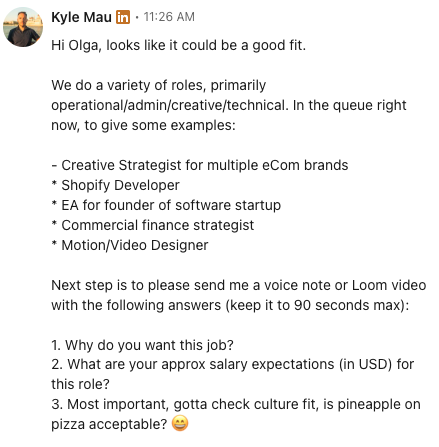
Here’s what I tell applicants to include in their Loom:
- Tell me why you want this job
- Tell me your salary expectations
- Tell me whether pineapple on pizza is acceptable.
- Keep it under 90 seconds.
You learn a lot from that 1 video or voice note.
- Can they follow instructions? (You asked for 90 seconds and three things. Did they deliver?)
- Do they have personality, or are they reading from a script? Did they write something generic in AI and then just literally read it out loud? (You’d be shocked how many people do this).
- And can they get to the point/communicate clearly — because if someone can’t express themselves in 90 seconds, they’re going to waste your time on every Slack message for the next year.
Here is what it looks like in practice:
And here’s what I specifically do NOT want to hear:
“Well… I don’t like pineapple on pizza, but I don’t judge. I think we should be accepting of diverse choices.”
Talk about a dud.
If someone can’t have an opinion about pizza, how are they going to have an opinion about anything in your business? You’re not hiring a diplomat. You’re hiring a person. With a personality. Or at least, that’s the goal.
I actually run a lightning round of personal questions in every interview specifically to test this. Not to get “right” answers — to see if they have any ounce of personality.
The lightning round includes things like:
- What did you want to be as a kid?
- Favorite pizza topping?
- Favorite place you’ve traveled?
- Ferrari or Lamborghini?
- Snow or surf?
- Do you wear sunscreen?
- What’s the craziest thing you’ve done in your life?
These questions have zero to do with the job.
They have everything to do with whether I want to talk to this person for more than 15 minutes.
If someone lights up talking about their backpacking trip through Southeast Asia, great — they’re a human.
If someone says they don’t wear sunscreen and follows it up that they love skydiving, I know they have an appetite for risk.
If someone chooses not to answer Ferrari or Lamborghini and says BMW, I know they’re not someone who shoots for the stars. I can trust them to reliably execute things. I probably can’t expect them to run the company.
If every answer feels calculated and safe, that tells me a lot about how they’ll operate in the role.
The Questions You Should Ask Yourself (Not the Candidate)
Now that you know the answer to the question of, “What is a Virtual Assistant?”, here’s what you need to ask yourself before you actually pull the trigger on hiring one.
Here’s something nobody talks about in hiring articles:
The most important interview is the one you have…with yourself. After the interview ends.
Before I make any hire — VA or otherwise — I run through these questions honestly:
- Would I be disappointed if a competitor snatched this person? Name a competitor you hate and imagine them working there. If you feel nothing, that’s your answer.
- Do I trust this person to solve problems without me? Or will I be secretly checking everything they touch?
- If this hire failed, would I say “I should’ve known”? If there are red flags now, they don’t get smaller after you hire them.
- Do they show hunger without entitlement? There’s a massive difference between “I want to grow” and “I deserve more.”
- Do they make me sharper, or do I feel like I have to dumb things down?
- Do they energize me or drain me after a 30-minute conversation?
- Am I genuinely thrilled to hire this person? Not “they’re fine.” Not “they check the boxes.” Thrilled. If the answer isn’t yes, the answer is no.
- Can they get to the point? Do they narrate too much? If someone takes 5 minutes to answer a simple question in an interview, imagine what Slack will look like every day.
These questions are the difference between a hire that works and a hire that drags on for three months before you finally admit it’s not working.
Trust your gut — but train your gut to ask the right questions.
Pro tip:
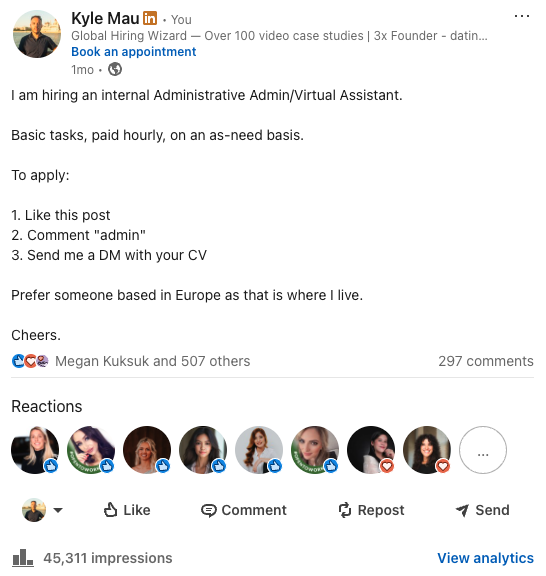
Posting VA roles on LinkedIn is also wildly effective for growing your own following. Every applicant who comments and engages with the post boosts it in the algorithm. You’re hiring and building your brand at the same time.
Step 2: Stack Short Interviews
Because the role is entry-level enough, you can run 15-20 minute initial interviews.
Set up a separate calendar link just for this role.
Stack them back-to-back — you can comfortably do 2-3 hours in a row of these.
Six to ten interviews in one sitting.
The back-to-back format is critical because you can compare candidates while they’re fresh in your mind. By interview #8, you’ll know who stood out. If someone can’t make the time you’ve set, they can figure it out — with this much inbound interest, you’re not bending your schedule for one candidate.
If you have enough applicants, you can even do group interviews — bring 3-4 candidates into the same call and watch how they interact. This is surprisingly revealing for a role that requires communication and collaboration.
Step 3: The Trial Task (90 Minutes, Not a Week)
Don’t give someone a week-long trial project. Give them 90 minutes and see what they produce.
The trial should test what the job actually requires: Write a response to a client email, format a post or document based on an SOP you provide, create a basic graphic using a template. Give them something with a clear process — a checklist or SOP — because that’s what the job is. You’re hiring someone to follow systems, not invent them.
Here’s the sneaky part that nobody talks about: Check their AI usage.
Everyone uses AI these days. There’s no point pretending they don’t or telling them not to. What you want to see is whether they have a brain.
There’s a massive difference between someone who prompts ChatGPT with “write a response to a customer complaint” and gets generic slop, versus…
Someone who prompts it with “write a response to a customer complaint about a delayed order. The tone should be apologetic but professional. Here are three key points to hit. Ask me clarifying questions first before drafting.”
The first person is a button-pusher. The second person is a thinker who uses AI as a tool. Hire the second person.
The 3 Ways to Hire a Virtual Assistant
1. DIY (Freelance Platforms)
Go on Upwork, Fiverr, OnlineJobs.ph, or similar platforms and hire someone yourself. Cheapest option. You handle the recruiting, vetting, interviewing, onboarding, training, and management.
This works if:
You have time to sift through hundreds of profiles, you know exactly what you’re looking for, and you’re prepared to manage a remote worker directly. Be warned — the failure rate on DIY VA hires is high, because most business owners underestimate how much time the vetting and management takes.
Or…you know. Don’t do this.
2. “Managed” VA Companies (The Plug-and-Play Model)
Companies that hire VAs as their employees and assign them to you. They handle recruiting, training, and management. Typically come out to about $3,000 per month. Many of these are Philippines-based operations.
Here’s my honest take on this model: The entire concept is flawed.
A lot of these companies sell you an “Assistant” — but when your person goes on vacation or quits, they just “plug in” a replacement. Sounds convenient. Think about it for two seconds and it falls apart.
The entire point of a good assistant is someone who KNOWS you.
Your preferences, your way of thinking, your communication style. You build that over months. You can’t plug someone in and get that. If a person is truly “plug-and-playable,” they’re not doing EA work — they’re doing admin work. And that’s fine. But you’re paying EA prices for admin capability.
Take that $3,000+ a month you’d pay one of these companies — and hire the absolute best person you can afford directly. Pay them what they’re worth. No middleman markup. That person will be the type who doesn’t just do the admin but knows what admin needs to get done and does it before you ask. The type of person you’ll miss when they’re on vacation — but who planned things so meticulously that it still runs smooth while they’re gone.
The best people are not plug-and-playable. That’s the whole point.
3. Recruitment / Placement Agency
A company like HireUA finds, vets, and places a VA who works directly for you. We handle the sourcing, screening, and matching. The person is yours — embedded in your business, dedicated to you, growing with you.
This is the Marcos and Sophia model. She wasn’t assigned to him from a pool. She was selected, vetted, and placed specifically for his business. That’s why she went from EA to ops manager. That’s why he flew to Poland. You don’t build that kind of partnership with a rotating pool of plug-in temps.
If it doesn’t work out, we replace them at no cost. But unlike the managed model, the goal is to find the right person once — not to create a revolving door.
How to Set Your VA Up for Success
This is the part everyone skips, and then they blame the VA when things go sideways.
Step 1: Do the Time Audit First
I already covered this above. If you don’t know what to delegate, your VA won’t know what to do.
Step 2: Document Before You Delegate
Record a quick Loom video of yourself doing each task. “Here’s how I respond to a client email.” “Here’s how I schedule a meeting.” “Here’s how I update the CRM.” Those 5-minute recordings become your training library. Way faster than writing out SOPs, and your VA can rewatch them anytime.
Step 3: Define “Done” (This Is Non-Negotiable)
The single biggest mistake I see business owners make with VAs: They assign a task and say “I’ll know when it’s done when I see it.”
That is not a standard. That is a recipe for frustration on both sides. You must use the Definition of Done.
For every task, write down what “done” actually means.
Not: “Update the CRM.”
Instead: “All new leads from today’s calls are entered with full contact info, deal stage is set to ‘Contacted,’ and notes from the call are pasted in the activity log. Done = every field complete, no blanks.”
This requires you to think — which is the actual hard part.
But once you define “done” clearly, your VA can self-check their own work. They don’t need to come to you with “is this right?” because the standard is already written down. This one habit will save more VA relationships than anything else I can tell you.
How to Train a Virtual Assistant: The Triple S Training Method
Show, Supervise, Shut Up.
This is the framework I use and recommend to every client. Three phases for every task you hand off:
Phase 1: Show.
You do the task while they watch. Screen share, narrate everything — every click, every decision, every “I do it this way because…” Don’t just show what you do. Show why. Record it so they can rewatch.
Phase 2: Supervise.
Now they do the task. You watch. This might be the next day or the next week depending on task complexity. They have the reins. You answer every question. You correct in real time. You let them struggle a little — but you don’t let them drown. This phase is where most of the learning happens.
Phase 3: Shut Up.
This is the hard one for business owners. You sit on the call with them — camera off — and you let them work. They are expected to operate autonomously. You’re only there as a safety net for serious issues. If they can get through a full session without needing you, they own the task. If they can’t, you go back to Phase 2.
At the end of Phase 3, the VA should be able to write the SOP for that task themselves. That’s how you know the transfer is complete. They don’t just do it — they can teach someone else to do it.
- Show.
- Supervise.
- Shut Up.
Scale this across every task you hand off and you’ll have a VA running independently within a month.
The First 30 Days With Your New VA
Start With 3-5 Tasks, Not 30
Don’t dump everything on them week one. Pick the 3-5 tasks from your time audit that are most clearly delegatable. Run each one through the Triple S method. Then add more. Build trust on both sides.
Daily Check-Ins for Two Weeks
15 minutes a day. What did you do, what questions do you have, what problems came up. After two weeks, move to weekly. After a month, you’ll barely need regular check-ins — they’ll be running on their own.
Give Feedback Immediately
If they format an email wrong on day two, fix it on day two. Not day thirty. Early, direct feedback prevents bad habits from forming. Most people are too “nice” to give feedback early and too frustrated to give it kindly later. Flip that. Be direct early. It’s kinder in the long run.
VA vs. EA vs. Specialist
This trips people up constantly.
Virtual Assistant is a generalist. They handle a range of admin and operational tasks. They execute what you tell them and handle things within defined processes. Best for business owners who need general support across multiple areas.
Executive Assistant is a specialist who manages a CEO’s entire workflow. They don’t just execute — they anticipate, decide, and manage. They’re embedded in your world. Significantly more expensive, significantly more impactful. If your bottleneck is that YOU are the bottleneck, you might need an EA, not a VA. Full EA breakdown here.
Functional Specialist is someone dedicated to one area: Bookkeeper, social media manager, SDR, designer, developer. If your primary need is in one specific function, a generalist VA isn’t the answer. You need someone with deep expertise in that domain.
The wrong hire isn’t just the wrong person — it’s the wrong role definition. Get clear on what you actually need before you start looking.
What Is A Virtual Assistant: Bottom Line
A Virtual Assistant isn’t some magical solution that replaces you. It’s a real person who takes real work off your plate so you can focus on the things that actually grow your business.
The business owners who get this right — who do the time audit, set clear expectations, define what “done” means, and invest in the onboarding — get 15-25 hours a week of their life back. That’s not an exaggeration. I’ve watched it happen hundreds of times. Marcos went from doing everything himself to running a million-dollar agency. The VA was the first domino.
The ones who get it wrong — who hire the cheapest person they can find, dump tasks on them with no context, and expect mind-reading — end up frustrated and convinced that “VAs don’t work.”
VAs work. The setup is what matters.
If you’re ready to hire a VA who’s been properly vetted and matched to your specific needs — not a random profile from a freelance platform — book a call with HireUA.
We’ll help you figure out exactly what you need, find the right person, and set you both up for success. And if it doesn’t work out, we replace them.
That’s the deal.
What Is A Virtual Assistant: FAQ
How many hours a week do I need from a VA?
Most people start with 20 hours a week (part-time). That’s enough to cover email management, calendar, CRM updates, and a few other recurring tasks. If you find yourself consistently maxing out those 20 hours within the first month, it’s time to go full-time. Some business owners start at 10 hours for very specific tasks, but in my experience, you’ll outgrow 10 hours within weeks once you see what’s possible.
Do I need to be available during the same hours as my VA?
You need overlap, but you don’t need identical schedules. 3-4 hours of overlap is enough for most VA relationships. That gives you time for a daily standup, real-time collaboration on urgent tasks, and quick questions. The rest of their hours can be async.
What if my VA doesn’t work out?
It happens. People are people. The key is to cut it early — within the first 2-3 weeks you’ll know if it’s a fit. Don’t wait 3 months hoping it gets better. If you hired through a placement service like HireUA, we replace them at no additional cost. If you hired directly through a freelance platform, you’re starting the search over from scratch.
Can a VA handle sensitive business information?
They’ll need access to your email, calendar, CRM, and potentially financial systems. That’s the nature of the role. Use an NDA, limit access to what’s necessary, and use tools like LastPass or 1Password for password sharing so they never see your actual credentials. Any reputable placement service should have their VAs sign confidentiality agreements as part of the engagement.
How is a VA different from hiring someone full-time?
Functionally, it can be very similar — especially if you hire a full-time remote VA at 40 hours/week. The main differences: They’re typically classified as contractors, they provide their own equipment, and you don’t carry the overhead of benefits, office space, or employment taxes. For US-based businesses hiring overseas VAs, this significantly reduces the all-in cost compared to a W-2 employee.
What tools should I use to work with a VA?
At minimum:
- Slack, Teams, or Whatsapp for daily communication
- Google Workspace or Microsoft 365 for documents and calendar
- A project management or task tool (Asana, Trello, Monday — pick one and stick with it)
- Loom for recording training videos.
If your VA handles sales or client work, they’ll need access to your CRM. You don’t need a complicated tech stack. You need clear processes and consistent communication.
Do I need SOPs before I hire a VA?
Yes. But they don’t need to be fancy. A Loom video of you doing the task while narrating your thinking is an SOP. A Google Doc with bullet points and screenshots is an SOP. A checklist in Asana with the steps and the “definition of done” written out is an SOP. You don’t need a 30-page operations manual. You need enough documentation that your VA can complete a task without guessing.
Will my VA write SOPs for me?
Yes — but you need to teach them how first.
Most VAs won’t instinctively know how to document a process the way you’d want it documented.
Show them your format, show them an example, and then have them write the SOP after they’ve completed the Triple S training (Show, Supervise, Shut Up).
By Phase 3, they understand the task well enough to document it. This is actually one of the highest-leverage things a VA can do — once they’re writing SOPs, you’re not just delegating tasks, you’re building a system that survives beyond any single person.