

You want Donna Paulsen or Pepper Potts as a Personal Assistant.
You want the Personal Assistant who handled 19 things while you were in your morning meeting — and you didn’t even know about 18 of them until you read the recap.
You want Pepper Potts, who kept the entire company running while the CEO playing superhero.
You want the Personal Assistant who anticipated every request before the words left your mouth.
That’s the fantasy. And here’s the thing:
It’s not fiction. Assistants like that exist. We’ve placed them. We’ve built the systems that create them. The business owner who opens their daily report, makes four decisions in ten minutes, and moves on with their day while their Assistant handles everything else — that’s real. It happens every day.
But it doesn’t start there.
Here’s where it starts:
I assigned a hotel booking to an Assistant last year with crystal clear instructions. Exact hotel: The Westin Warsaw. Exact dates. Which nights to use a free rewards certificate, which nights to pay cash. I’d even logged into the rewards account myself to confirm availability beforehand.
Twenty-minute task. Maybe thirty if you’re being thorough.
Instead, I got questions back about a completely different hotel I never mentioned. Then a suggestion for yet another hotel. Then — finally — a booking at the one I originally asked for.
The back-and-forth took three hours of messages across three days.
When I asked what happened, the explanation was that she’d never heard of the Westin and thought I meant “the west side of the hotel.”
“Westin Warsaw” is one Google search away.
The problem isn’t that someone doesn’t know something. That’s fine. Nobody knows every hotel brand on the planet. The problem is what they do when they’re unsure.
A great Assistant reads “Westin Warsaw,” doesn’t recognize it, Googles it in five seconds, sees it’s a hotel, and books the room. Task complete. You never even know there was a moment of confusion.
A mediocre Assistant reads “Westin Warsaw,” doesn’t recognize it, and instead of doing one search — starts guessing. Suggests alternatives nobody asked for. Creates a thread. Turns a non-problem into a three-day conversation.
And here’s the kicker:
It always gets done eventually. That’s the trap. The task gets completed, so it LOOKS like everything worked. You got the hotel. It’s booked. Seems fine.
But you burned three days of messages and mental energy on something that should have been completely invisible to you. Multiply that by every task, every week, every month.
That’s the distance between where you are and Donna Paulsen.
It’s not talent. It’s not magic. It’s systems, preferences, judgment, and time.
This guide is everything we know about closing that distance — what a Personal Assistant actually does, what they cost, what to expect, and how to build the version that makes your life feel like Harvey Specter’s looks on television.
We’ve placed over a thousand Assistants into businesses around the world at HireUA. This is how it works.
Table of Contents
- What a Personal Assistant Actually Does (It’s Not What You Think)
- The Daily Report
- The Doer and the Bulldozer
- The Donna Paulsen Fantasy
- What a Personal Assistant Costs
- Remote Works. Seriously.
- How to Set Your Assistant Up to Win
- The One-Google-Search Test
- Where AI Fits (And Where It Doesn’t)
- What You’re Really Looking For
- FAQ
What a Personal Assistant Actually Does (It’s Not What You Think)
If you Google “personal assistant duties,” you’ll get the same list on every website. Calendar management. Travel booking. Email. Errands. Scheduling appointments.
All technically correct. All completely useless.
It’s like describing a chef’s job as “uses knives and applies heat to food.” True. Missing the point entirely.
A Personal Assistant’s real job is to make decisions disappear.
Not the big ones. Not strategy. Not “should we pivot the business” or “should I take this partnership.” Those are yours. Always will be.
The ones that kill you are the small ones.
Hundreds of them, every day.
- Which flight. Which hotel.
- When to schedule the dentist.
- Whether to respond to that email now or later.
- What to get your wife for her birthday.
- Where to eat Tuesday night.
- Whether the parking fine is worth disputing.
Each one takes thirty seconds to a minute. None of them are hard. All of them require you to stop what you’re actually doing, context-switch, make a decision, context-switch back, and try to remember where you were.
A great Assistant takes all of that off your plate. Not by reading your mind — that’s a fantasy we’ll get to in a minute — but by building a system where your preferences, your patterns, and your priorities are documented, referenced, and executed without you needing to be in the loop.
Here’s what that looks like in practice.
I keep a document for every Assistant I hire.
It has my hotel preferences — Hilton first, then Marriott, then IHG. High floor, king bed, never pay for breakfast unless the family is traveling.
It has my train preferences — open compartment only, seat facing the direction of travel, book two seats if they’re cheap enough so I don’t sit next to a stranger.
It has my barber — same person every time, always morning or evening, book the next one on the day of the current one.
It has my European flight layover rankings for major hubs — Amsterdam, Warsaw, Zurich, Munich, Paris, in that order.
None of this is complicated. It’s just specific.
And once it’s written down, a good Assistant executes it without asking. They book the Hilton on a high floor with a king bed. They find the open compartment on the 9:18 train. They schedule the barber at 9am and put the next appointment on the calendar before I’ve even left the chair.
Let me give you a real example with email, because that’s where most people’s time actually goes.
Personal Assistant — Email/Inbox Management
The goal of having an Assistant manage your email is simple:
You should never have to respond to an email yourself. No email should reach you without your Assistant reading it, sorting it, and — whenever possible — drafting a response for your approval.
In practice, that means labeling.
Every email gets sorted into a priority structure. The ones that genuinely need your input go into a folder with your name on it — and even those should come with a drafted response when possible. The ones your Assistant can handle go into their own folder. Sales opportunities get tracked separately. Newsletters get filed. Personal items get flagged but kept separate from business.
Over time, the amount that lands in your folder shrinks.
In the first month, you’re reviewing and approving most responses. By month three, your Assistant is handling sixty percent of your inbox without your involvement. By month six, you’re opening your email and seeing three things that need your attention instead of eighty.
Personal Assistant — Calendar Management
Calendar works the same way.
It’s not “schedule this meeting.” It’s knowing that Monday and Thursday are your work days with flexible scheduling.
Tuesday and Wednesday are focus days — minimal external meetings, only priorities.
Friday mornings are always free.
Meetings get stacked together — no gaps between them — because you’d rather do four calls in a row and have the rest of the day clear than have them scattered across the afternoon with thirty-minute dead zones in between.
A good Assistant learns all of this in the first week. A great one starts enforcing it by week two — declining meeting requests that land on Friday morning without even asking you, because the rule is clear.
That’s the real job.
Not “calendar management.” Not “email management.” Not “travel booking.”
Taking your preferences, learning your patterns, and making hundreds of small decisions vanish from your day — so completely that you forget they ever existed.
The Daily Report
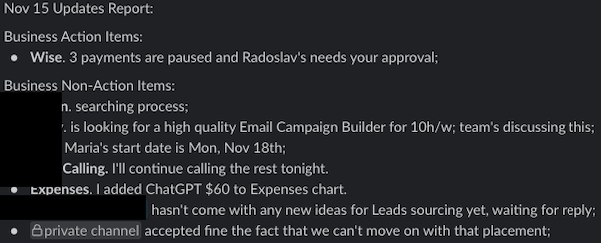
Every day at a set time, my Assistant sends me a structured report. Four sections. Takes me about ten minutes to process. And it’s the single most important thing for my sanity.
Section 1: Business Action Items
Things that need my decision or response. But not just “this happened.” Each one comes with context, a link to the email or Slack thread, and a recommended solution.
“Client X is unhappy about the speed of placement. I spoke with the team. Here are three options. Option 1: extend the timeline and explain why. Option 2: add a second recruiter. Option 3: offer a partial credit. I recommend option 2 because we have capacity and it shows good faith. Here’s the Slack thread.”
That’s the format. Problem, options, recommendation. Every time.
Section 2: Business Non-Urgent
Things I should know about but don’t need to act on today. And my Assistant knows I don’t want fluff.
I don’t need to hear “we’re searching for candidates.” I need to hear “we’ve been searching for four days and have nothing — you may want to keep an eye on this.”
I don’t need “the client is happy.” I do like hearing “the client is happy” — but only if it’s specific. “Client loved their new hire, asked about filling another position.” That’s useful. “Everything is going well” is noise.
The filter matters. Telling me everything is the same as telling me nothing.
Section 3: Personal Action Items
Things that need my direct involvement.
The lawyer responded about the visa — here’s what you need to sign. I’ve researched rental cars for your trip — here are two options with prices, features, and pickup locations. Your wife’s birthday is in ten days and a present needs to be in your hands a week before.
Section 4: Personal Non-Urgent
Reminders and updates. Dinner with a friend at 5pm. Researching office spaces, will bring options to our meeting tomorrow. The parking fine was waived — here’s the confirmation.
That’s it. Four sections. I open it, make decisions, move on with my day.
Here is a (admittedly a sparse day/update as most of them contain lots of details I can’t share publicly) example:
Here’s why this matters:
Most people run their day reactively. Inbox, Slack, whatever’s loudest. Whoever screams first gets attention. Everything else falls through the cracks.
Think about it this way. If you worked in an office, would you let anyone open your door and start screaming anytime they wished? Would you let people ring your front doorbell and demand you drop your day for them?
That’s the real-life equivalent of an unmanaged inbox.
The daily report flips that. It turns chaos into a structured decision-making dashboard. Nothing gets lost. Nothing gets forgotten. The priorities are surfaced for you — you’re not digging through 200 emails to find the three that actually matter.
And here’s the part most people don’t think about:
The report also trains your Assistant. The act of writing it forces them to prioritize, filter, and think about what actually matters versus what’s just noise. Over time, their judgment sharpens. The reports get tighter. The recommendations get better. Six months in, your Assistant is making half the decisions without even asking — because the daily report taught them what you care about and what you don’t.
The Doer and the Bulldozer

Not every Assistant is the same hire.
When someone calls us and says “I need a Personal Assistant,” the first thing we figure out is which kind they actually need. It comes down to two questions:
What are the tasks, and how much judgment do they require?
The “Doer” Follows Instructions
Give them a clear task with a clear outcome and they execute. Data entry. Scheduling appointments you’ve already decided to take. Posting content you’ve already created. Managing a spreadsheet. Processing orders. Booking flights when you’ve told them your preferences.
These are valuable tasks — they eat hours of your week and somebody needs to do them. But the key word is “instructions.” The Doer needs them. Detailed ones. Tell them which hotel, which dates, which room type — they’ll book it perfectly. But if you just say “find me a hotel in XYZ city,” you’ll get back five options and a thread asking for your preferences on location, price range, breakfast, loyalty program, room type, and floor level. That’s not their fault. You didn’t give them enough to work with.
For global talent, a Doer costs between $1,000 and $1,500 per month. Full-time. Dedicated to your business. And for tasks that genuinely just need execution, this is the right hire. Don’t overpay for judgment you don’t need.
Then There’s The “Bulldozer”
The Bulldozer doesn’t just complete tasks — they drive through walls to close them.
They draft emails in your voice before you ask. They notice that your Tuesday is overbooked and move the less important call to Wednesday without being told. They read the email from the lawyer, summarize the three things that matter, flag the one that needs your signature by Friday, and have it ready in your inbox with a reminder set for Thursday.
When I give a task with one unclear element, a Bulldozer figures it out. They Google it. They call someone. They look at how similar tasks were handled last time. They bring me the answer, not the question.
But here’s what most people miss:
The Bulldozer handles the uncomfortable stuff. They send the conversation recap email after a meeting where commitments were made — so when someone says “I don’t remember agreeing to that” four months later, the receipt is there. They push back on a vendor who sent a handwritten note instead of an official service record. They call the same car dealership four times in two weeks, getting passed from receptionist to manager to voicemail and back, because the job isn’t done until the proper document is in hand.
That persistence is the whole point. The Doer completes the task. The Bulldozer closes the loop — and everything between the task and the closed loop is their problem, not yours.
For example, a HireUA team member had previous experience working with a high-net-worth individual, and literally got a plane to hold on the runway so he could make it on.
For global talent, a Bulldozer costs between $2,000 and $3,500 per month. The difference isn’t just experience — it’s initiative. You’re paying for someone who reduces the number of decisions you make per day, not just the number of tasks on your list.
The mistake most people make is hiring a Doer and expecting a Bulldozer.
Or worse — hiring a Bulldozer at a Doer’s budget and wondering why the candidates feel junior.
We see it all the time.
Someone describes tasks that clearly need judgment, anticipation, and independent problem-solving — managing their inbox, coordinating with vendors, handling client relationships, running their calendar with context about priorities — and then says their budget is $500 a month.
That budget gets you task execution. It doesn’t get you someone who knows that when your wife’s birthday is three weeks away, the present should be in your hands a week before, and they should start researching options two weeks out without you ever bringing it up.
That’s the difference.
And it’s worth understanding before you start interviewing.
The Donna Paulsen Fantasy
Here’s something we hear on discovery calls more than anything else:
“I need someone to manage me.”
Sometimes the words are slightly different.
“I need someone to keep me organized.”
“I need someone to tell me what I should be focusing on.”
“I need someone to hold me accountable.”
“I need someone to show me how to work with them, more so than the other way around.”
This is the Donna Paulsen fantasy.
Harvey Specter walks into the office, and Donna has already anticipated everything — rescheduled the conflicting meetings, prepared the brief, handled the client who called angry at 7am, and left the right file on his desk before he sat down. Harvey doesn’t manage Donna. Donna manages Harvey. And he’s better for it.
Business owners watch that and think: “That’s what I need.”
And they’re not entirely wrong. An Assistant who anticipates, who filters, who protects your time and your attention — that’s real. We’ve built that. It exists.
But here’s what the show doesn’t tell you:
First, it’s Hollywood.
Second…it’s Hollywood.
This fictional, and I repeat, fictional character — didn’t show up on day one reading Harvey’s mind.

She learned him. Over years. She learned that he takes his coffee black. She learned which clients he’ll take calls from at 6am and which ones go to voicemail. She learned the difference between Harvey being quiet because he’s thinking and Harvey being quiet because he’s furious.
That doesn’t happen in a week. And it doesn’t happen without Harvey doing his part — being consistent in his preferences, communicating clearly when something matters, and building the trust that lets Donna operate with authority.
In real life, the “Donna” is earned. Not hired.
And keep in mind:
She’s fictional.
If your constant instruction is “figure it out” with no context, no documentation, and no framework for how you like things done — you’re going to be disappointed. And it won’t be their fault.
I had an Assistant once who was given a simple task:
Make sure we have food and coffee ready at 9am for a meeting. I gave her the name of a bakery. I said to try to order coffee in jugs or those containers you see at events.
Instead of just making it happen, it became a three-week saga spread across four meetings.
First it was “savory or sweet?” — a question that should have been asked the day the task was assigned, not a week later. Then it was “coffee places in Poland don’t sell jugs.” Then “what kind of coffee?” Then she’d just order a bunch of Americanos and carry them over. Then she realized she couldn’t carry them all. Then “do we need water?” Then “can you buy the water and carry it upstairs?” Then she’d bring her coffee machine from home. Then “what capsules? What intensity? What kind of cups should I buy?”
The task was:
Food and coffee at 9am. That’s it.
Every problem was narrated to me instead of solved. Every obstacle was bounced back as a question. The entire process was a boomerang — thrown at the Assistant, returned to me with a new complication attached, thrown again, returned again.
That’s not a Donna. That’s the opposite of a Donna.
The reality of hiring an Assistant is this:
You have to invest time upfront to save time forever. The SOPs, the preference documents, the “here’s how I like things done” conversations — they’re not optional. They’re the foundation. Skip them, and you’ll spend more time managing your Assistant than you spent doing the tasks yourself.
Build the foundation, and six months from now, food and coffee just appears at 9am. The right hotel is booked. The parking fine is disputed and won. The birthday present is wrapped and in your hands a week early. And you never had to think about any of it.
That’s what buying back your time actually looks like.
What a Personal Assistant Costs
In the United States, hiring a full-time Personal Assistant starts at roughly $75,000 per year when you factor in salary, payroll tax, health insurance, workers’ comp, equipment, and office space. In major cities like New York, Los Angeles, or San Francisco, that number climbs to $90,000 or higher. That’s $6,000-$7,500 per month for a single hire — and you’re managing their payroll, their benefits, their PTO, and their performance reviews on top of it.
Through a global hiring company, the numbers look different.
A Doer-level Assistant — someone who executes tasks with clear instructions, manages your calendar, handles scheduling, processes data, books travel from your preference document — costs $1,000 to $1,500 per month. Full-time. Forty hours a week. Dedicated to you.
A Bulldozer-level Assistant — someone who manages your inbox with judgment, drafts communications in your voice, coordinates across multiple vendors and stakeholders, runs your daily report, and makes independent decisions within defined authority — costs $2,000 to $3,500 per month. Same terms. Full-time, dedicated, not split across six other clients.
Here’s where people get it wrong.
We get discovery calls regularly where someone describes strategic-level work — manage my inbox, handle my calendar with judgment, coordinate with my vendors, run my personal life — and then says their budget is $800.
That gets you task execution. Good task execution, with the right person. But not judgment. Not anticipation. Not the Assistant who sees your wife’s birthday coming and starts researching gifts two weeks before you remember it yourself.
We also get the opposite.
Someone who needs six hours a week of data entry — copying numbers from one system to another — and they’re prepared to spend $2,500 because they’ve heard that’s what a “good” Assistant costs. That’s overpaying for the scope. A $1,200 hire handles that beautifully. Save the budget for when the role grows.
The right approach is to match the budget to the level of judgment you need.
Repetitive tasks with clear instructions? Lower tier.
Inbox management, calendar judgment, daily reports, vendor coordination, personal logistics? Higher tier. And be honest about which one you’re actually hiring for — because the person who copies spreadsheet data for $1,200 a month is not the same person who drafts emails in your voice for $2,800 a month.
The math that most people skip:
If your business generates $300,000 a year, your time is worth roughly $144 per hour. Every hour you spend booking trains, researching rental cars, chasing a car dealership for service records, dealing with the latest government request or answering emails that someone else could handle — that’s $144 of your productive capacity gone.
A $2,000 per month Assistant who handles three hours of that per day gives you back roughly 60 hours a month. At $144 per hour, that’s $8,640 in recovered productive time. For $2,000.
The question isn’t whether you can afford a Personal Assistant.
The question is whether you can afford to keep doing everything yourself.

Remote Works. Seriously.
Unless you need someone to physically hand you a coffee, pick up your dry cleaning, or drive your car to the shop — a remote Personal Assistant can do everything an in-person one can do.
This surprises people. It shouldn’t.
My Assistant — fully remote — has booked my barber appointments through an online platform, using a login stored in our shared password manager. She’s disputed a parking fine and won. She’s chased a car dealership for three weeks to get a proper service record after they tried to hand us a handwritten note instead of an official document. She’s ordered food delivery for a meeting through Uber Eats. She’s researched rental cars and presented three options with prices, features, car seat availability, and pickup locations — then booked the one I chose with free cancellation.
She’s booked restaurants with specific seating requests — patio if the weather is good, confirmed by phone. She’s coordinated with lawyers across three countries about visa paperwork. She’s managed payroll for a distributed team across multiple currencies on Wise.
None of that requires being in the same city.
It requires a laptop, a phone, good judgment, and access to the right accounts.
The one thing a remote Assistant genuinely can’t do is be physically present.
If you need someone to receive a package, walk your dog, or show up at your office to set up a meeting room — that’s either a local hire or a service. But for the vast majority of what a Personal Assistant does — the coordination, the communication, the research, the booking, the inbox management, the daily report — physical proximity is irrelevant.
We’ve also placed Assistants who happen to be in the same city or country as the business owner. Dubai, smaller European cities, large international hubs. It’s not something we sell as a feature, but when it lines up, it’s a bonus.
How to Set Your Assistant Up to Win
Most people skip this part. They hire someone, hand them a laptop, and say “here’s my email, figure it out.”
Then they’re shocked when it doesn’t work.
Setting up an Assistant properly takes effort upfront. Real effort — not “send them a few bullet points” effort. We’re talking documented preferences, recorded processes, clear definitions of what “done” looks like. The investment pays back every single day for as long as the hire lasts. Skip it, and you’ll be the person writing angry Slack messages about hotel bookings.
Record yourself doing it.
Every task you want to hand off — record a Loom of yourself doing it first. Three minutes. Walk through it exactly as you do it. Don’t script it. Don’t make it pretty. Just screen-share and narrate. “Here’s how I book a haircut. I go to this website. I log in with these credentials — they’re in 1Password. I click ‘Standard Haircut.’ I always book the same person. If she’s not available, check with me before booking anyone else. As soon as the appointment is confirmed, book the next one.”
That three-minute video becomes their reference. Forever. They watch it once, execute it a hundred times.
Turn the Loom into an SOP.
Take that video and throw it into an AI tool. AI writes the steps. Now your Assistant has both — the video showing exactly how it’s done, and the written steps they can reference without rewatching. Hand them both.
Define what “done” looks like.
Every task should have a Definition of Done. Not “book the flights.” Instead: “Present a list of options with prices, duration, number of stops, and layover cities. Seat preference is aisle first, window second. Economy or premium economy. One stop maximum, Amsterdam layover preferred.”
When your Assistant knows exactly what the finished product looks like, they stop guessing. They stop asking questions they could answer themselves. They deliver something you can approve in thirty seconds instead of something that launches a three-day thread.
Teach them the 1-3-1.
When a problem comes up — and problems will always come up — your Assistant should never just dump it in your lap. The format is simple: 1 clearly defined problem. 3 potential solutions they’ve researched. 1 recommendation with their reasoning.
“The accountant hasn’t responded in two weeks. Option 1: I call them again tomorrow. Option 2: I schedule a meeting through their assistant. Option 3: I find two alternative firms and book consultations. I recommend option 3 because this is the third time they’ve gone silent and it’s not worth chasing.”
You read it, say “go with 3,” and you’ve spent ten seconds on something that could have been a twenty-minute conversation.
Build the paper trail.
For important conversations — especially ones where commitments are made or problems are discussed — have your Assistant send a written recap by email afterward. Subject line: “Conversation Recap — [Topic], [Date].” It’s CC’d to you and filed.
This sounds bureaucratic. It’s not. It’s the thing that saves you when someone says “I don’t remember agreeing to that” six months later. The recap is there. In writing. Dated. Indisputable.
Let them use your name.
This one is uncomfortable for some people, but it works. When your Assistant sends emails on your behalf, have them send from your email account — and sign with their own name.
“Kind regards, [Assistant name], Assistant to [Your name].”
People tend to take “the assistant” less seriously than the person they actually want to reach. Sending from your account gives your Assistant the weight of your title. They get faster responses. Things move quicker. And when someone replies, it goes straight back to your inbox where your Assistant is already managing it.
It’s not deception. They’re signing their own name. Everyone knows it’s the Assistant writing. But the email comes from your address, and that makes all the difference.
The One-Google-Search Test
I mentioned the Westin story at the top. Here’s what it taught me.
The hotel incident wasn’t a disaster. Nobody lost money. Nobody got fired. The room got booked. On the surface, everything was fine.
But it revealed something I now watch for in every hire. I call it the One-Google-Search Test.
Give your new Assistant a task in the first two weeks that contains one unfamiliar element. Something they’ll have to look up. Something that requires a single search to resolve.
Maybe it’s a hotel brand they’ve never heard of. Maybe it’s a software tool they haven’t used. Maybe it’s a reference to a person or company they need to quickly research. Nothing obscure — just something that isn’t immediately obvious.
Then watch what happens.
If they search, solve, and move on — you’ve got someone who can operate independently. Someone who treats a gap in their knowledge as a five-second problem, not a five-message thread.
If they come back with questions about something they could have answered themselves in ten seconds — you’ve got your answer too. Not about their intelligence. About their instinct. When this person hits something unfamiliar, their default is to ask rather than to figure it out.
That default doesn’t change. It’s not a training issue. It’s not something that improves in month three. The person who Googles “Westin Warsaw” in five seconds on day one is the same person who’ll independently resolve a vendor issue on day ninety. The person who guesses that “Westin” means “west side” on day one is the same person who’ll boomerang a simple catering order into a three-week saga.
One search. That’s the whole test.
Where AI Fits (And Where It Doesn’t)
If you Googled “personal assistant” and some of the results were about Siri or Alexa or ChatGPT — you’re not crazy. The terms overlap. And the fantasy is the same one that’s been in the movies for decades.
Jarvis. The AI that runs Tony Stark’s life.
Anticipates every need. Manages the house, the schedule, the suit, the security system. Answers questions before they’re fully asked. Knows everything about everything and never sleeps.
That’s the real AI Personal Assistant fantasy.
Not “Siri, what’s the weather today.”
That’s a parlor trick.
The fantasy is a system that actually knows you — your schedule, your preferences, your relationships, your priorities — and manages your life the way a great human Assistant would, but without the salary.
The technology isn’t there. Not yet. Maybe someday…soon.
But as of right now, no AI system can call your car dealership four times to chase down a service record. No AI can sense that a client’s email sounds more tense than usual and flag it for your attention. No AI knows that when you say “book the usual” you mean your regular barber, 9am, standard cut, and schedule the next one on the way out.
AI is a tool your Assistant should be using.
The best ones already are — drafting SOPs from Loom transcripts, researching options faster, formatting reports, summarizing long email threads. AI makes a good Assistant faster and more efficient. It doesn’t replace the judgment, the persistence, the context, and the relationship that make a human Assistant valuable.
One more thing on this. During a recent hire, we had five candidates submit test assignments. Four of them sent back responses that were clearly generated by AI — generic, polished, could have been written about any company for any role. One sent something specific, detailed, clearly written by a human who had actually thought about the task.
That’s the one who got hired.
If your future Assistant’s first communication with you reads like a machine wrote it — keep looking.
What You’re Really Looking For
The word “Personal Assistant” has become a catch-all. People use it when they mean a dozen different things — and most of the time, what they describe on a discovery call doesn’t match the title they used when they booked it.
Some people say “Personal Assistant” when what they actually need is someone to do data entry for six hours a week. That’s a Virtual Assistant. Different hire, different price, different expectation.
Some people say it when they need help building a business from scratch — company formation, tax strategy, hiring, marketing.
That’s not any kind of Assistant.
That’s a consultant, a fractional COO, or a very senior operator.
No single hire is doing all of that, and calling it a “Personal Assistant” role is how you end up frustrated and blaming the person you hired.
Some people say it when what they really want is someone to manage them — to hold them accountable, to tell them what to focus on, to impose structure on their chaos. We covered that already. That’s the Donna fantasy. It’s earned over months, not hired on day one.
And some people say “Personal Assistant” and actually mean it.
They want someone to manage the admin of their personal and professional life. Inbox, calendar, travel, personal logistics, vendor coordination. They want to buy back their time. They have a budget that matches the scope. They’re ready to build the systems.
If you’ve read this far and you’re still not sure which one you are, here’s the simplest filter:
If the tasks are repetitive, clearly defined, and don’t require much judgment — you probably need a Virtual Assistant. That’s the Doer.
If the tasks require managing your life, anticipating your needs, operating with discretion, and making decisions on your behalf — you need a Personal Assistant. That’s the Bulldozer.
If you’re not sure what the tasks even are yet — you probably need a conversation before you need a hire.
FAQ
How much does a Personal Assistant cost?
Through HireUA — $1,000-$1,500 per month for execution-focused roles and $2,000-$3,500 per month for strategic, high-judgment roles.
Full-time, dedicated to you.
What does a Personal Assistant do?
Everything from inbox management and calendar coordination to travel booking, vendor management, personal errands coordination, daily reporting, and independent decision-making within defined authority.
The scope depends on the level of the hire and the systems you build together.
What’s the difference between a Personal Assistant and an Executive Assistant?
An Executive Assistant typically focuses on business operations — calendar, inbox, meeting prep, stakeholder management.
A Personal Assistant handles the personal side — travel, family logistics, appointments, household coordination, gift buying, lifestyle management. In practice, most great Assistants do both. The title matters less than the scope of work.
Can a Personal Assistant work remotely?
Yes.
The vast majority of what a Personal Assistant does — booking, researching, coordinating, communicating, managing inboxes, handling vendor relationships — requires a laptop and good judgment, not physical proximity. The only tasks that require in-person presence are physical errands like picking up packages or dropping off documents.
Do I need a full-time Personal Assistant?
It depends on your workload.
If your daily report alone generates an hour of decisions and you have travel, inbox, and personal logistics to manage — full-time will fill up faster than you think.
What skills should a Personal Assistant have?
Judgment, communication, follow-through, and resourcefulness.
Organizational skills are table stakes — everyone lists them. What separates a great Assistant from a mediocre one is what they do when they hit something they don’t know. Do they Google it and solve it? Or do they come back with a question they could have answered in ten seconds?
Is hiring a Personal Assistant worth it?
If your time is worth more than $50 per hour and you’re spending multiple hours per day on tasks that don’t require your specific expertise — yes.
The ROI isn’t theoretical.
A $2,000 per month Assistant handling three hours of your day gives you back 60 hours a month. Do the math with your own hourly rate.
How do I hire a Personal Assistant?
Start by defining the scope — Doer or Bulldozer?
Document your preferences and processes before you start interviewing. Use a trial task during the hiring process. And run the One-Google-Search Test in the first two weeks.
The Westin got booked. Eventually. Three days later than it should have been, after messages and explanations and back-and-forth that never needed to happen.
Most people’s experience with Assistants looks like that. The task gets done, sort of, with more friction than it should take. And over time, the friction adds up until you start thinking “it’s faster if I just do it myself.”
It doesn’t have to be that way.
Build the systems. Record the Looms. Write down your preferences — all of them, even the ones that feel too specific to bother with. Define what “done” looks like for every task. Teach them the 1-3-1 when problems come up.
And find someone who, when they see a word they don’t recognize, opens a new tab instead of a new thread.
Donna Paulsen didn’t show up on day one anticipating Harvey’s every move. Pepper Potts didn’t walk into Stark Industries already knowing how to run it. They were built — through time, through trust, through systems, through hundreds of small moments where they figured it out instead of asking.
That’s what you’re building. Not a fantasy. A system. And when it works — and it does work — you’ll forget what it was like to do everything yourself.
Click Here to Hire a Personal Assistant