

If you’re about to hire an eBay Virtual Assistant, there are 3 rules.
Follow them and this hire works.
Break any one of them and you’ll be back at zero in 90 days, telling everyone in the seller forums that VAs are a scam.
- Rule 1: Don’t give yourself another job
- Rule 2: Used items — you shoot, they do everything else
- Rule 3: New items — the barcode does the work
That’s the whole article.
Everything below is me showing you exactly how each rule works, the handoff system that makes them run, and why most sellers break all 3 without ever knowing the rules existed.
We’ve placed over 1,100 people into businesses around the world — a big chunk of them ecommerce operators drowning in the same backlog you’re staring at right now.
This is the honest version.
Real pricing, the actual system, and the parts nobody selling you a $3/hour lister wants to say out loud.
Rule 1 — Don’t Give Yourself Another Job
Every seller who hires an eBay Virtual Assistant and regrets it makes the same mistake.
They hire too early.
Here’s how it plays out:
- You hire someone
- They’re ready to work Monday morning
- And you have nothing prepared for them — no photographed inventory, no backlog, no queue
So now, to keep this person busy, YOU have to go unbox items, clean them, test them, and shoot photos.
All week.
Every week.
You took on a hire to save time, and instead you manufactured a deadline machine that runs on your own labor.
By week 2, you resent them.
By week 6, you’ve decided “VAs don’t work for eBay.”
And it was never their fault.
You gave yourself another job to justify the first one…
Here’s the deal:
You don’t hire an eBay Virtual Assistant to create capacity.
You hire one to attack a backlog.
The green light looks like this.
You have bins of inventory that are already photographed and waiting. Items pile up faster than you can list them.
Your death pile isn’t a sourcing problem or a photo problem — it’s a listing problem.
You are the bottleneck between “photographed” and “live on eBay.”
That’s when you hire.
Not before.
Because when the backlog exists, your new Virtual Assistant walks into a mountain of work on day one.
They’re busy every hour of every day for their first weeks.
You’re not scrambling to feed them. They’re digging you out.
The last thing you want from a hire is more work for yourself.
If you’d have to create tasks to keep them busy, you’re not ready — and hiring anyway will make your life worse, not better.
Rule 2 — The Used-Goods Rule
This is where most sellers talk themselves out of the whole thing.
The objection goes:
“I still have to take the photos, test the items, clean them, measure them. By the time I’ve done all that, I might as well list it myself.”
No, you might as well SHOOT it yourself.
Listing it is a different job.
And that’s the entire point of this rule.
eBay’s own policy settles where the line sits. For used items, stock photos are prohibited — the buyer has to see the actual unit, the actual scratches, the actual wear.
Which means the camera work is physical, local, and yours.
No eBay Virtual Assistant on the other side of the planet can photograph the jacket on your table.
So here’s the line, and it never moves.
You keep everything that requires hands:
- Sourcing
- Unboxing
- Cleaning
- Testing
- Measuring
- Photographing
- Packing
- Shipping
They take everything that requires a keyboard:
- Titles
- Item specifics
- Categories
- Descriptions
- Pricing research
- Comps
- Undercut checks
- Buyer messages
- Relisting stale inventory
Now do the math on your own workflow.
The camera work is fast. Batch 20 items, shoot them one after another — you’re done in an hour.
The part that actually builds your death pile is what comes after:
Turning each photo set into a complete listing… The right category. Full item specifics. A title that isn’t garbage.
Comps pulled so the price makes sense.
That’s the grind.
That’s the 10-15 minutes per item that turns 250 unlisted items into a room you avoid walking into.
You’ve been treating this as 1 job.
It’s 2 jobs!
One of them needs your hands. The other one just needs your inventory — and it’s the one eating your life.
Give away the keyboard.
Keep the camera.
Rule 3 — The New-in-Box Rule
If you sell new and sealed — retail arbitrage, liquidation pallets, wholesale, shelf-pull clearance — the rules change completely.
In your favor.
For brand new, factory-sealed products, eBay allows catalog and manufacturer images.
eBay maintains a product catalog tied to UPCs, and the “Sell one like this” feature pulls the image, the item specifics, and the product details straight into a listing. Which means for new-in-box inventory, you barely touch the camera at all.
You buy 50 sealed items at a liquidation sale.
You send your Virtual Assistant a photo of the receipt and a shot of each barcode — or just a list of UPCs in a spreadsheet.
That’s it.
- They pull the catalog data
- Build every listing
- Research the going price
- Load the drafts
Your total hands-on time per item is measured in seconds.
And check this out:
Books, movies, music, and video games are exempt from eBay’s actual-photo requirement entirely.
The catalog covers them.
If you’re flipping media, a barcode scan IS the listing.
This is the category where an eBay Virtual Assistant produces the most volume with the least input from you — even when the disc itself is used.
So before you hire, answer one question.
— What percentage of your inventory is used versus new and sealed?
— Mostly used?
You’re a Rule 2 operation.
Your VA’s job is the listing grind behind your camera.
— Mostly new?
You’re a Rule 3 operation.
Your VA runs almost the entire pipeline off barcodes, and your job shrinks to sourcing and shipping.
Most sellers are a mix.
Fine…
Run both rules at once.
The system underneath them is identical.
The Handoff System That Makes It Work
Here’s the part everyone skips, and it’s the reason most eBay VA hires die.
Sellers hire a person and skip building the pipe.
Then the photos arrive in random text messages, the VA asks 15 questions per item, the seller re-does half the work — and everyone concludes delegation doesn’t work.
Delegation works.
Their handoff was broken.
Here’s the system.
Five steps.
Steal it.
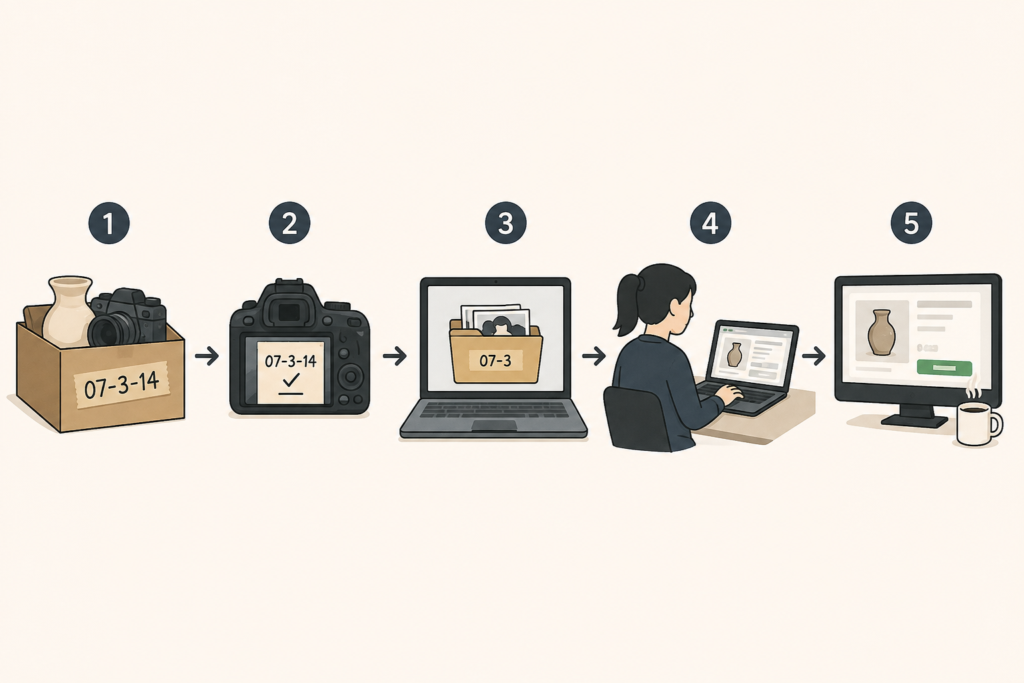
Step 1 — Every item gets a SKU
A simple code: month, batch, item number.
07-3-14.
Write it on painter’s tape, stick it on the item or the bin.
This number follows the item from your garage to the sold order.
Step 2 — The last photo is the note
When you shoot an item, the final frame in the set is a card or sticky note: SKU, condition grade, and anything the photos can’t show — “tested, works,” “small chip on base,” “no remote.”
This one habit eliminates 90% of the back-and-forth.
Your VA never has to ask “what’s wrong with this one?” because the answer is in the photo set.
Step 3 — Dump to a shared drive
One folder per batch, photos grouped by SKU. Google Drive is fine.
No app to buy, nothing fancy.
The dump IS the work order — when photos land in the folder, the VA gets to work.
No brief, no call, no Slack thread.
Step 4 — They build drafts, not live listings
Your eBay Virtual Assistant creates every listing as a draft in eBay: title, category, item specifics, description, shipping details, and their pricing research with comp links.
The draft bank fills up while you sleep — they’re usually in a time zone that works while you don’t.
Step 5 — You review, price, and publish
Open the draft bank with your coffee.
Scan each draft, set the final price, hit publish.
A batch of 20 takes you minutes, not an afternoon.
You kept the judgment.
You gave away the grind.
Notice what you’re NOT doing in this system:
- You’re not writing titles
- You’re not filling in 14 item specifics
- You’re not pulling comps at 11 pm
- And you’re also not doing the other broken thing — hovering over their shoulder re-checking every field until you’re doing the job twice.
The seller who verifies every word their VA writes hasn’t delegated anything.
They’ve hired an assistant for their assistant.
Review the drafts, yes — especially the first few weeks.
But review means scan, price, publish.
Not redo.
Give Them Access Without Giving Them Your Password
The number one fear, every time: “I’m not giving some stranger my eBay password.”
Good.
Don’t.
eBay has a feature built for exactly this, and almost nobody knows it exists: Multi User Account Access.
You grant a specific person permission to create and edit drafts and listings — and nothing else.
No password shared.
No access to your payments, your account settings, or your sold history.
You can revoke it in 2 clicks the moment something feels off.
Your Virtual Assistant works inside your account, on your listings, with their own login, and the blast radius if it goes wrong is a draft you delete.
The sellers still emailing photo batches back and forth because they’re scared to share access are solving a problem eBay already solved.
Set up the permission on day one and the entire draft-bank system above runs natively inside eBay.
One thing you should hold back at the start:
Pricing authority.
Let them research comps and propose a price in the draft.
You approve it.
Once they’ve proven their pricing judgment matches yours — and with a good hire, it will — you can hand over pricing on your low-dollar items and keep approval only on the big stuff.
Trust is built in stages.
Access is granted in stages.
That’s how you protect the account and still get the leverage.
The Archive — Never List the Same Item Twice
This is the part that separates a Virtual Assistant from a listing gig — and it’s worth more than everything above it.
From day one, your VA builds an archive.
A Google Drive, organized by category, then product.
Inside each product folder:
- The finished title
- The item specifics
- The description
- The measurements
- The shipping weight
- The pricing history
Why?
Because you’re going to buy that same coffee machine again.
Resellers source in patterns. The same brands show up at the same thrift stores, the same models come through the same liquidators.
And the tenth time you source an item, you should not be paying anyone — including yourself — to research it from scratch.
Here’s what the archive does to your per-item time.
New-in-box repeat item:
Everything gets reused. Photo, title, specifics, description, price.
The second listing is a two-minute clone of the first.
Used repeat item:
The whole skeleton gets reused — title, specifics, category, measurements, weight, description template, comp research.
The only thing that changes is the condition photos and the condition note, because every used unit is different.
That’s still 80% of the work already done before anyone starts.
By month 3, a real percentage of what you source is already in the archive.
By month 6, your eBay Virtual Assistant is faster than they were in month one — not because they’re rushing, but because the work compounds.
Every listing they build makes the next one cheaper.
Now, pay attention:
Nobody paid by the listing will ever build this for you.
A gig worker cranking out $1 listings has zero reason to create an asset they’ll never see again.
The archive only exists when one dedicated person owns your catalog long enough to benefit from their own organization.
Which brings us to the trap.
Why Paying Per Listing Is the Trap
Search around and you’ll find the going rates: $0.25 to $1 per listing.
Job posts offering $3 an hour, some of them paying in crypto.
Sellers hiring off gig platforms for pocket change and then complaining — loudly — that the work was garbage, the person vanished after the first payment, or the listings were sell-similar clones with junk titles and empty item specifics.
Nobody connects the two.
So let me connect them.
When you pay per listing, you are paying for speed.
Not for sales.
Read that again, because the incentive does all the damage.
A per-listing worker makes more money by making more listings.
Item specifics don’t pay extra.
A researched title doesn’t pay extra.
Checking whether the comp they found is actually the same model — doesn’t pay extra. So they skip everything that doesn’t pay, blast out volume, and the quality craters.
They’re not lazy.
They’re responding rationally to the deal you offered them.
And the $3/hour version is the same trap in a different outfit.
A person earning $3 an hour cannot afford to work only for you.
They stack clients — three, four, five stores at once — and your response times and listing quality decay on the same 90-day schedule every underpaid hire decays on.
We wrote about this exact cycle in our Ecommerce Virtual Assistant guide, and eBay sellers fall into it harder than anyone because the race-to-the-bottom rates are normalized in this niche.
Pay for the Month, Not the Listing
A dedicated monthly hire flips every incentive.
They’re paid to make your store sell, not to make your counter go up.
- They learn your categories
- They build the archive
- They notice that your vintage audio listings sell 30% above comps and start pricing accordingly
- They get faster AND better every month, because your store’s success and their job security are the same thing
You’re not paying for listings.
You’re paying for someone to care whether the listings work.
Can’t ChatGPT Just Do This?
Fair question.
Half the seller forums say yes.
Here’s the honest answer:
AI is a real tool in this workflow, and your Virtual Assistant should be using it.
Drafting a description from clean inputs, reformatting a title, filling boilerplate — AI does that faster than any human, and pretending otherwise is denial.
But run your actual inventory through it and watch where it breaks.
It misidentifies the obscure stuff — and the obscure stuff is where your margin lives. And it can’t reliably tell one espresso machine model from another when the difference is worth $200.
It can’t judge condition from your photos the way a person who’s seen your last 400 items can.
And it can’t do the comp work that matters on long-tail inventory, where titles are inconsistent, half the sellers never enter UPCs, and matching “same item, same condition” is human pattern recognition, not a database lookup.
So the real answer isn’t AI or VA.
It’s a Virtual Assistant who uses AI properly — as a drafting tool with a human checking the output — versus a gig worker who pastes whatever the machine spits out and hits submit.
One of those makes you faster.
The other one puts a wrong model number in a $400 listing and earns you a return, a negative, and a defect on your account.
The tool got better.
The need for judgment didn’t go anywhere.
Buyer Messages Are a Ranking Signal
There’s a second job hiding inside this hire, and most sellers never think to delegate it: the inbox.
— “Will this fit a 2015 Camry?”
— “Would you take $40?”
— “Can you measure pit to pit?”
Every one of those messages is a buyer with their wallet already half open.
Answer fast and warm, and you win the sale.
Answer slow — or with one cold sentence — and they buy the same item from the seller three listings down.
And on eBay, it’s bigger than the single sale.
Your response speed, your feedback score, and your seller performance feed the machine that decides how visible your listings are.
Top Rated status is worth real money.
Every hospitable, fast, complete answer protects it.
Every ignored message and every avoidable negative chips at it.
I think about this through the lens of Be Our Guest, the Disney Institute’s book on service — the core idea being that you exceed expectations instead of merely meeting them.
On a marketplace where a thousand sellers list the same item at the same price, the seller who answers in 20 minutes with the exact measurement and a “happy to grab another photo if it helps” is the one who gets the sale, the positive feedback, and the repeat buyer.
A good eBay Virtual Assistant covers your inbox across time zones you’re asleep in.
Screen for the person who answers like a host, not a clerk.
It’s one of the few edges left in a marketplace where everyone sells the same stuff.
eBay Virtual Assistant Cost — 2026 Pricing
Here’s the pricing table nobody else will give you, adjusted for 2026:
| Role | US Cost (Annual) | Global Talent (Monthly) |
|---|---|---|
| eBay Virtual Assistant — Part-Time (20 hrs/week) | $28,000 | $500–$800 |
| eBay Virtual Assistant — Full-Time (40 hrs/week) | $52,000 | $1,000–$1,500 |
| Ecommerce Operations Manager — Full-Time | $70,000+ | $2,000–$3,000+ |
The difference isn’t quality.
It’s cost of living.
Same skills, same output, different zip code.
And before you anchor on the $3/hour posts you’ve seen floating around: that price point is how you end up hiring someone who’s already working for 2 other stores.
The real floor for competent, dedicated, full-time ecommerce talent in 2026 is $7-10/hour.
Below that, you’re renting a fraction of a person and you’ll get a fraction of the results — on the 90-day churn schedule we covered above.
Run it against your own numbers.
If a full-time Virtual Assistant clears your backlog and keeps you at listing capacity, what does that do to your monthly sales?
For most sellers sitting on hundreds of unlisted items, the math stops being close.
What This Looks Like When It Works
We’ve been working with Support Pets — an ecommerce company in the emotional support animal space — since 2022.
Not an eBay store.
Same machine.
Before working with us, their words: they struggled to source affordable team members, and the time spent sifting resumes, scheduling interviews, and vetting candidates was a huge lift.
Sound familiar?
It’s the same wall every seller hits when they post a VA job and get 300 applications that all say “detail-oriented.”
Through us they’ve hired a Designer, an Executive Assistant, and a QA team member.
Between the 3 roles, they’re saving over $150,000 a year in salary — before counting the time they got back.
And the part they highlight isn’t the savings.
It’s that the screening was already done before they ever sat down for an interview, and that a replacement guarantee took the risk out of the decision.
That’s the actual product.
Not a body in a seat — a hiring machine that’s already run so you don’t have to build one.
The feeling you’re buying is simple.
You hand off a batch, you go live your life, and you come back to find it done.
That’s what the draft bank gives an eBay seller.
Photos go in, listings come out, and the death pile starts shrinking without you touching a keyboard.
Common Questions About eBay Virtual Assistants
How much does an eBay Virtual Assistant cost?
Full-time, dedicated global talent runs $1,000-$1,500 per month.
Part-time starts around $500.
The same hire in the US costs $52,000 a year before benefits.
Anything near $3/hour is a shared, churning resource — you’ll pay less and re-hire more.
What does an eBay Virtual Assistant actually do?
Everything on the keyboard side of the line: listing creation, titles, item specifics, categories, descriptions, pricing research and comps, undercut monitoring, buyer messages, relisting stale inventory, and maintaining your product archive.
What they can’t do is the physical work — photos of used items, testing, cleaning, packing, shipping.
Is it safe to give a Virtual Assistant access to my eBay account?
Yes — if you do it through eBay’s Multi User Account Access instead of sharing your password.
You grant listing-and-draft permissions only, they log in with their own credentials, and you can revoke access instantly.
They never touch your payments or account settings.
Can an eBay Virtual Assistant handle dropshipping stores?
Yes, and the workflow is even more remote-friendly — there’s no camera work at all.
Product research, listing creation, order processing, supplier issues, and customer messages all happen on the keyboard.
The same rules in this article apply, minus Rule 2.
Can I just find one on Fiverr or Upwork?
You can.
You’ll get hundreds of AI-written proposals, the entire screening burden lands on you, and the per-listing pricing model on those platforms rewards volume over quality.
Gig platforms work for one-off projects.
For someone who’ll run your listing operation and touch your account every day, you want an actual hiring process.
How many listings per day should I expect?
It depends on your category and how complete your photo-and-note handoff is.
Clean handoffs with the SKU-note system produce dramatically more than photo dumps with no context — which is the real lesson.
The bottleneck is almost never the VA’s speed.
It’s the quality of what you hand them.
Should my Virtual Assistant handle buyer messages too?
Yes — it’s the highest-leverage part of the job after listings.
Fast, warm, complete answers win sales and protect the seller metrics that determine your search visibility.
Screen for hospitality, not just typing speed.
Closing Thoughts — eBay Virtual Assistant
Go back to the 3 rules.
Don’t hire until the backlog exists and you’re the bottleneck.
Keep the camera on used goods and give away everything after it.
Let the barcode do the work on anything new and sealed.
The sellers who say Virtual Assistants don’t work on eBay broke Rule 1 — they hired into thin air and ended up working for their own assistant.
Or they paid by the listing and got exactly the quality they paid for.
The system was never the problem.
They never built one.
Your death pile isn’t going to list itself.
And every week it sits there, it’s not just clutter — it’s revenue, boxed up, waiting for a listing that doesn’t exist yet.
We’ll find you the person.
The screening is done before you ever get on a call, the replacement guarantee means a miss costs you nothing, and the first thing your new hire sees is that beautiful, terrible backlog you’ve been avoiding.
Book a call to hire an eBay Virtual Assistant →

Tell Us Who You Need.
Tell us what needs to get off your plate. We’ll help define the role, tell you what it should cost, and recruit in the talent market where that role is strongest.